
昇思MindSpore 1.5不会安装?看这篇!
昇思MindSpore 1.5不会安装?看这篇!

作者:Kaierlong |来源:开源博客
笔者在参加MindCon比赛过程中,需要用到昇腾硬件平台来跑一些推理步骤。但是当开通相应服务器及使用相应镜像后,在测试MindSpore是否安装成功的环节,出现了如下错误:
./tensor_add_sample: error while loading shared libraries: libopskernel.so: cannot open shared object file: No such file or directory
这使我意识到昇腾硬件平台的环境配置并没有想象中那么简单,也许大家也有相关的困扰,故而整理这篇文章供大家参考借鉴。
1 购买云资源
购买云资源
注意:
- 系统镜像选择Ubuntu 18.04 server 64bit for Ai1s
- 规格选择AI加速型
- 默认购买的云资源没有开通公网,需要购买一个弹性公网进行IP绑定
前往昇腾硬件平台:
_https://www.huaweicloud.com/product/ecs/ascend.html_,按自己需要购买合适云资源。新手可以选择按需模式,节省资金。
本文购买的云资源如下图所示。
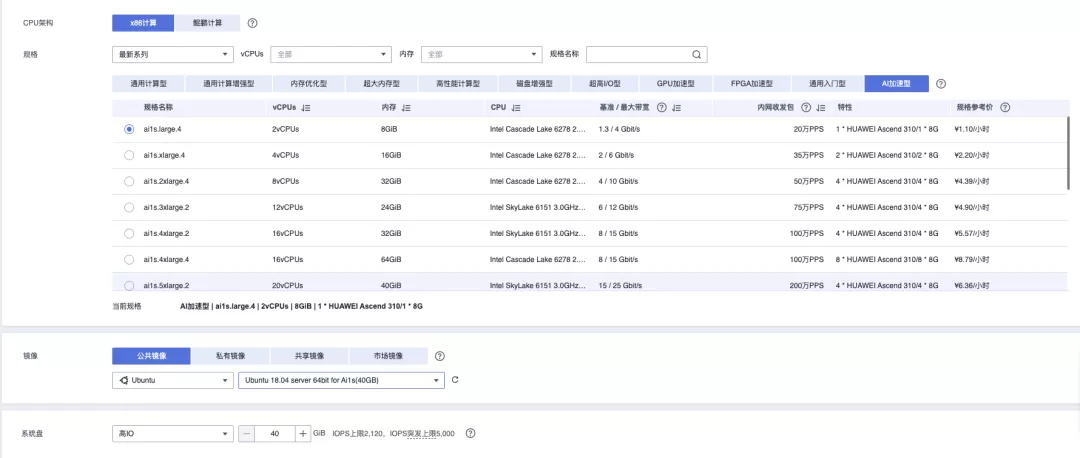
之后根据提示配置网络等,开通服务器。
2 环境配置
2.1 更新系统
sudo apt update
sudo apt upgrade
sudo apt autoremove
sudo apt autoclean
sudo apt clean
2.2 创建目录
创建目录用户存储后续的虚拟环境和代码
mkdir pyenvs
mkdir codes
2.3 更新cmake
系统自带的cmake版本较低,无法满足后续的一些操作,故升级。
注意事项:
- 在服务器端使用wget下载cmake源码可能速度太慢,建议本地下载好之后上传到服务器
sudo apt autoremove cmakecd ~/codeswget https://github.com/Kitware/CMake/archive/refs/tags/v3.20.1.tar.gzscp v3.20.1.tar.gz root@124.71.78.174:/root/codes/tar -zxvf v3.20.1.tar.gzCMake-3.20.1/./bootstrapmakesudo make install
2.4 安装gflags
后续的一些编译工作需要用到gflags
cd ~/codes
wget https://github.com/gflags/gflags/archive/refs/tags/v2.2.2.tar.gz
scp v2.2.2.tar.gz root@124.71.78.174:/root/codes/
tar -zxvf v2.2.2.tar.gz
cd gflags-2.2.2/
mkdir build && cd build
export CXXFLAGS=-D_GLIBCXX_USE_CXX11_ABI=0
cmake .. -DBUILD_SHARED_LIBS=ON
make -j 10
sudo make install
2.5 更新昇腾硬件平台驱动及工具包
本文因条件限制采用社区版
社区版下载地址如下:
昇腾硬件平台****驱动下载地址:
昇腾硬件平台工****具包下载地址:
注意事项:
如果具备商业版下载条件,建议下载商业版。
商业版驱动下载地址:
商业版工具包下载地址:
2.5.1 昇腾硬件平台****相关文件下载
注意事项:
- 建议本地下载完成相应文件后,上传到服务器
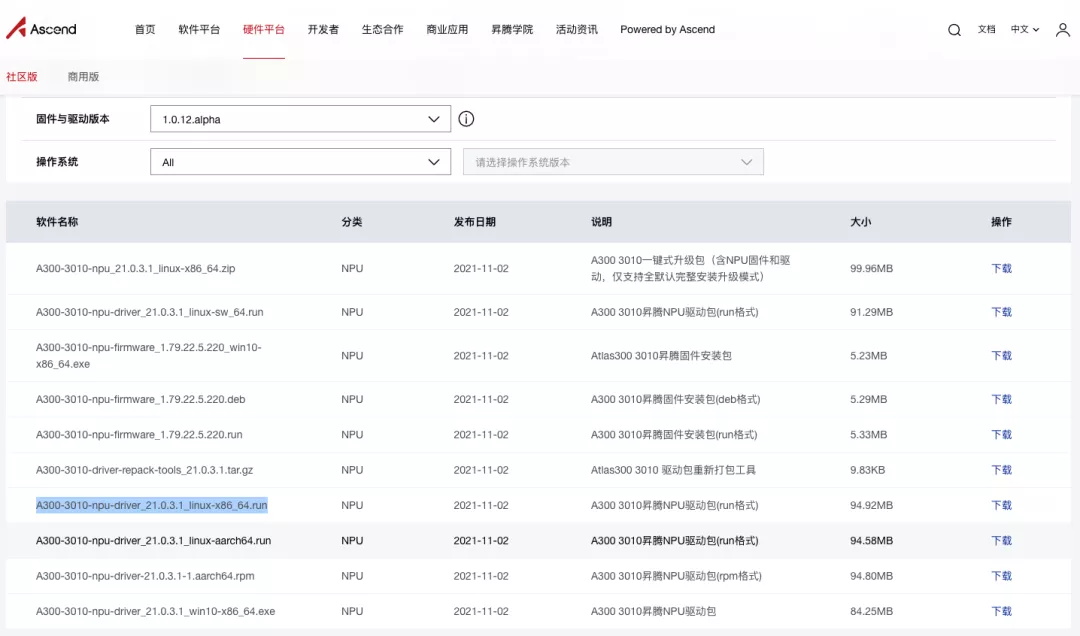
驱动文件如下图所示。
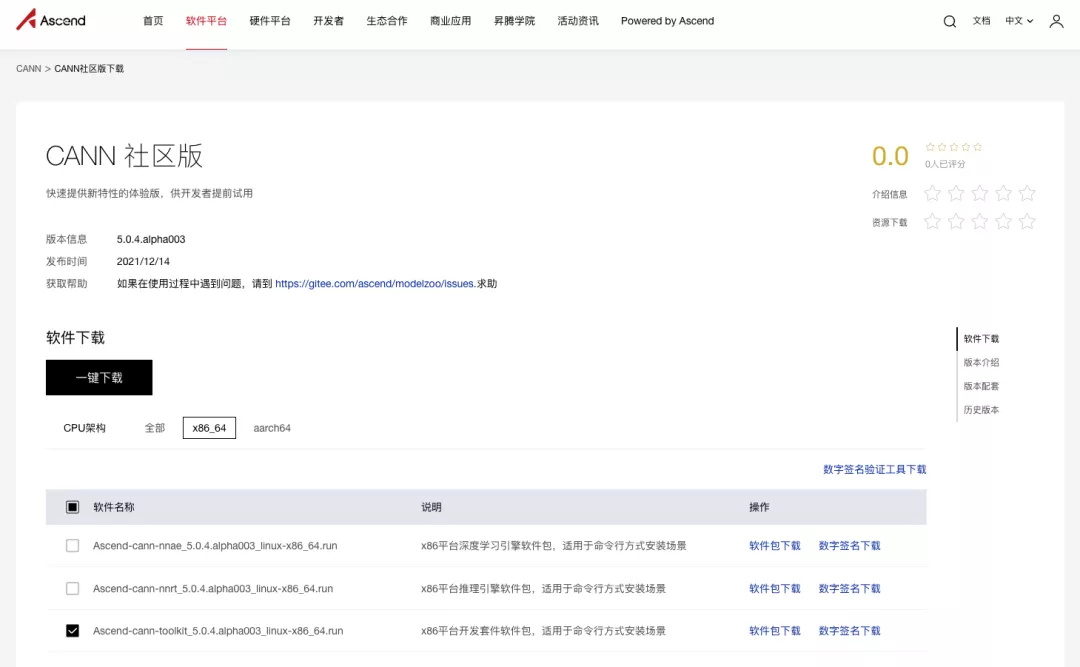
工具包文件如下图所示
2.5.2 驱动更新
本文上传到了服务器root账户的install文件夹下
进入安装文件所在目录
cd ~/install
安装驱动
# wget https://ascend-repo.obs.cn-east-2.myhuaweicloud.com/CANN/5.0.4.alpha003/Ascend-cann-toolkit_5.0.4.alpha003_linux-x86_64.run
chmod a+x A300-3010-npu-driver_21.0.3.1_linux-x86_64.run
sudo ./A300-3010-npu-driver_21.0.3.1_linux-x86_64.run --upgrade
驱动安装输出如下内容
Verifying archive integrity...  100%   SHA256 checksums are OK. All good.
Uncompressing npu-driver-run-package  100%
[Driver] [2021-12-16 16:12:38] [INFO]Start time: 2021-12-16 16:12:38
[Driver] [2021-12-16 16:12:38] [INFO]LogFile: /var/log/ascend_seclog/ascend_install.log
[Driver] [2021-12-16 16:12:38] [INFO]OperationLogFile: /var/log/ascend_seclog/operation.log
[Driver] [2021-12-16 16:12:38] [INFO]base version is 20.1.0.
[Driver] [2021-12-16 16:12:38] [WARNING]Do not power off or restart the system during the installation/upgrade
[Driver] [2021-12-16 16:12:38] [INFO]set username and usergroup, HwHiAiUser:HwHiAiUser
deleting install files...
remove install files successfully!
deleting installed folders...
remove install folders successfully!
[Driver] [2021-12-16 16:12:45] [INFO]driver install type: DKMS
[Driver] [2021-12-16 16:12:45] [INFO]upgradePercentage:10%
[Driver] [2021-12-16 16:12:48] [INFO]upgradePercentage:30%
[Driver] [2021-12-16 16:12:48] [INFO]upgradePercentage:40%
[Driver] [2021-12-16 16:13:35] [INFO]upgradePercentage:90%
[Driver] [2021-12-16 16:13:35] [INFO]upgradePercentage:100%
[Driver] [2021-12-16 16:13:35] [INFO]Driver package upgrade success! Reboot needed for installation/upgrade to take effect!
[Driver] [2021-12-16 16:13:35] [INFO]End time: 2021-12-16 16:13:35
2.5.3 工具包更新
配置python环境
cd /usr/local/bin
ln -s /usr/local/python3.7.5/bin/pip3
安装工具包
cd ~/install
chmod a+x Ascend-cann-toolkit_5.0.4.alpha003_linux-x86_64.run
sudo ./Ascend-cann-toolkit_5.0.4.alpha003_linux-x86_64.run --upgrade
工具包安装输出如下内容
Verifying archive integrity...  100%   SHA256 checksums are OK. All good.
Uncompressing ASCEND_RUN_PACKAGE  100%
[Toolkit] [20211216-16:20:33] [INFO] LogFile:/var/log/ascend_seclog/ascend_toolkit_install.log
[Toolkit] [20211216-16:20:33] [INFO] upgrade start
[Toolkit] [20211216-16:21:56] [INFO] Ascend-fwkacllib-1.75.22.0.220-linux.x86_64.run uninstall start
[Fwkacllib] [2021-12-16 16:21:56] [INFO]: Start time:2021-12-16 16:21:56
[Fwkacllib] [2021-12-16 16:21:56] [INFO]: LogFile:/var/log/ascend_seclog/ascend_install.log
[Fwkacllib] [2021-12-16 16:21:56] [INFO]: InputParams:--uninstall
[Fwkacllib] [2021-12-16 16:21:56] [INFO]: uninstall /usr/local/Ascend/ascend-toolkit/20.1.rc1/x86_64-linux full
[Fwkacllib] [2021-12-16 16:22:00] [INFO]: Fwkacllib package uninstall success! Uninstallation takes effect immediately.
[Fwkacllib] [2021-12-16 16:22:00] [INFO]: End time:2021-12-16 16:22:00
[Toolkit] [20211216-16:22:00] [INFO] rm soft link fwkacllib
[Toolkit] [20211216-16:22:00] [INFO] Ascend-toolkit-1.75.22.0.220-linux.x86_64.run uninstall start
[INFO] LogFile: /var/log/ascend_seclog/ascend_install.log
[INFO] OperationLogFile: /var/log/ascend_seclog/operation.log
[INFO] InputParams: --quiet
[INFO] base version is 1.75.22.0.220.
2021-12-16,16:22:00 [INFO] [MSVP] install_profiling_hiprof.sh: Begin to uninstall profiling...
2021-12-16,16:22:00 [INFO] [MSVP] install_profiling_hiprof.sh: Begin to stop profiling...
2021-12-16,16:22:00 [INFO] [MSVP] install_profiling_hiprof.sh: Stop profiler success
2021-12-16,16:22:00 [INFO] [MSVP] install_profiling_hiprof.sh: Uninstall profiling success.
deleting install files...
remove install files successfully!
deleting installed folders...
remove install folders successfully!
[INFO] Toolkit package uninstall success! Uninstallation takes effect immediately.
[Toolkit] [20211216-16:22:07] [INFO] rm soft link toolkit
[Toolkit] [20211216-16:22:07] [INFO] Ascend-opp-1.75.22.0.220-linux.x86_64.run uninstall start
[opp] [INFO]:Execute the opp run package.
[opp] [INFO]:OperationLogFile path: /var/log/ascend_seclog/ascend_install.log.
[opp] [INFO]:Input params: --uninstall --install-path=/usr/local/Ascend/ascend-toolkit/20.1.rc1/x86_64-linux --quiet
[opp] [INFO]:Begin uninstall the opp module.
[opp] [INFO]:Delete the ops soft link (/usr/local/Ascend/ascend-toolkit/20.1.rc1/x86_64-linux/ops).
[opp] [INFO]:Delete the installed opp source files in (/usr/local/Ascend/ascend-toolkit/20.1.rc1/x86_64-linux).
[opp] [INFO]:Delete the version info file (/usr/local/Ascend/ascend-toolkit/20.1.rc1/x86_64-linux/opp/version.info).
[opp] [INFO]:Delete the install info file (/usr/local/Ascend/ascend-toolkit/20.1.rc1/x86_64-linux/opp/ascend_install.info).
[opp] [INFO]:Opp package uninstall success! Uninstallation takes effect immediately.
Install MAJOR root 2021-12-16 16:22:09 xxx.xxx.xxx..xxx OPP success install_type=full; cmdlist=--uninstall --install-path=/usr/local/Ascend/ascend-toolkit/20.1.rc1/x86_64-linux --quiet.
[Toolkit] [20211216-16:22:09] [INFO] rm soft link opp
[Toolkit] [20211216-16:22:09] [INFO] Ascend-atc-1.75.22.0.220-linux.x86_64.run uninstall start
[Atc] [2021-12-16 16:22:09] [INFO]: Start time:2021-12-16 16:22:09
[Atc] [2021-12-16 16:22:09] [INFO]: LogFile:/var/log/ascend_seclog/ascend_install.log
[Atc] [2021-12-16 16:22:09] [INFO]: InputParams:--uninstall
[Atc] [2021-12-16 16:22:09] [INFO]: uninstall /usr/local/Ascend/ascend-toolkit/20.1.rc1/x86_64-linux full
[Atc] [2021-12-16 16:22:11] [INFO]: Atc package uninstall success! Uninstallation takes effect immediately.
[Atc] [2021-12-16 16:22:11] [INFO]: End time:2021-12-16 16:22:11
[Toolkit] [20211216-16:22:11] [INFO] rm soft link atc
[Toolkit] [20211216-16:22:11] [INFO] Ascend-pyACL-20.1.rc1-linux.x86_64.run uninstall start
[Toolkit] [20211216-16:22:11] [INFO] rm soft link pyACL
[Toolkit] [20211216-16:22:11] [INFO] Ascend-acllib-1.75.22.0.220-linux.x86_64.run uninstall start
[Acllib] [2021-12-16 16:22:11] [INFO]: Start time:2021-12-16 16:22:11
[Acllib] [2021-12-16 16:22:11] [INFO]: LogFile:/var/log/ascend_seclog/ascend_install.log
[Acllib] [2021-12-16 16:22:11] [INFO]: InputParams:--uninstall
[Acllib] [2021-12-16 16:22:11] [INFO]: uninstall /usr/local/Ascend/ascend-toolkit/20.1.rc1/x86_64-linux full
[Acllib] [2021-12-16 16:22:11] [INFO]: step into run_acllib_uninstall.sh ......
[Acllib] [2021-12-16 16:22:11] [INFO]: uninstall targetdir /usr/local/Ascend/ascend-toolkit/20.1.rc1/x86_64-linux, type full.
[Acllib] [2021-12-16 16:22:12] [INFO]: Acllib package uninstall success! Uninstallation takes effect immediately.
[Acllib] [2021-12-16 16:22:12] [INFO]: End time:2021-12-16 16:22:12
[Toolkit] [20211216-16:22:12] [INFO] rm soft link acllib_linux.x86_64
[Toolkit] [20211216-16:22:12] [INFO] rm soft link acllib
[Toolkit] [20211216-16:22:12] [INFO] /usr/local/Ascend/ascend-toolkit not empty
[Toolkit] [20211216-16:22:12] [INFO] toolkit uninstall success
[Toolkit] [20211216-16:22:12] [INFO] process end
[Toolkit] [20211216-16:22:12] [INFO] upgrade package CANN-runtime-5.0.4.alpha003-linux.x86_64.run start
[Toolkit] [20211216-16:22:13] [INFO] CANN-runtime-5.0.4.alpha003-linux.x86_64.run --full --quiet --nox11 --install-path=/usr/local/Ascend/ascend-toolkit/5.0.4.alpha003/x86_64-linux --install-for-all upgrade success
[Toolkit] [20211216-16:22:13] [INFO] upgrade package CANN-compiler-5.0.4.alpha003-linux.x86_64.run start
WARNING: Running pip as the 'root' user can result in broken permissions and conflicting behaviour with the system package manager. It is recommended to use a virtual environment instead: https://pip.pypa.io/warnings/venv
WARNING: Running pip as the 'root' user can result in broken permissions and conflicting behaviour with the system package manager. It is recommended to use a virtual environment instead: https://pip.pypa.io/warnings/venv
WARNING: Running pip as the 'root' user can result in broken permissions and conflicting behaviour with the system package manager. It is recommended to use a virtual environment instead: https://pip.pypa.io/warnings/venv
WARNING: Running pip as the 'root' user can result in broken permissions and conflicting behaviour with the system package manager. It is recommended to use a virtual environment instead: https://pip.pypa.io/warnings/venv
WARNING: Running pip as the 'root' user can result in broken permissions and conflicting behaviour with the system package manager. It is recommended to use a virtual environment instead: https://pip.pypa.io/warnings/venv
[Toolkit] [20211216-16:22:53] [INFO] CANN-compiler-5.0.4.alpha003-linux.x86_64.run --full --pylocal --quiet --nox11 --install-path=/usr/local/Ascend/ascend-toolkit/5.0.4.alpha003/x86_64-linux --install-for-all upgrade success
[Toolkit] [20211216-16:22:53] [INFO] upgrade package CANN-opp-5.0.4.alpha003-linux.x86_64.run start
[Toolkit] [20211216-16:23:16] [INFO] CANN-opp-5.0.4.alpha003-linux.x86_64.run --full --quiet --nox11 --install-path=/usr/local/Ascend/ascend-toolkit/5.0.4.alpha003/x86_64-linux --install-for-all upgrade success
[Toolkit] [20211216-16:23:16] [INFO] upgrade package CANN-toolkit-5.0.4.alpha003-linux.x86_64.run start
[Toolkit] [20211216-16:23:55] [INFO] CANN-toolkit-5.0.4.alpha003-linux.x86_64.run --full --pylocal --quiet --nox11 --install-path=/usr/local/Ascend/ascend-toolkit/5.0.4.alpha003/x86_64-linux --install-for-all upgrade success
[Toolkit] [20211216-16:23:55] [INFO] upgrade package Ascend-mindstudio-toolkit_3.0.3.B120_linux-x86_64.run start
[Toolkit] [20211216-16:23:56] [INFO] Ascend-mindstudio-toolkit_3.0.3.B120_linux-x86_64.run --full --quiet --nox11 --install-path=/usr/local/Ascend/ascend-toolkit/5.0.4.alpha003/x86_64-linux --install-for-all upgrade success
[Toolkit] [20211216-16:23:56] [INFO] upgrade package Ascend-test-ops_5.0.3_linux.run start
[Toolkit] [20211216-16:23:56] [INFO] Ascend-test-ops_5.0.3_linux.run --full --quiet --nox11 --install-path=/usr/local/Ascend/ascend-toolkit/5.0.4.alpha003/x86_64-linux --install-for-all upgrade success
[Toolkit] [20211216-16:23:56] [INFO] upgrade package Ascend-pyACL_5.0.3_linux-x86_64.run start
[Toolkit] [20211216-16:23:56] [INFO] Ascend-pyACL_5.0.3_linux-x86_64.run --full --quiet --nox11 --install-path=/usr/local/Ascend/ascend-toolkit/5.0.4.alpha003/x86_64-linux --install-for-all upgrade success
[Toolkit] [20211216-16:23:57] [INFO] /etc/Ascend/ascend_cann_install.info generate success
[Toolkit] [20211216-16:23:57] [INFO] Please make sure that:
PATH includes :
  /usr/local/Ascend/ascend-toolkit/latest/bin:
  /usr/local/Ascend/ascend-toolkit/latest/compiler/ccec_compiler/bin:
LD_LIBRARY_PATH includes :
  /usr/local/Ascend/ascend-toolkit/latest/lib64:
  /usr/local/Ascend/ascend-toolkit/latest/compiler/lib64/plugin/opskernel:
  /usr/local/Ascend/ascend-toolkit/latest/compiler/lib64/plugin/nnengine:
PYTHONPATH includes :
  /usr/local/Ascend/ascend-toolkit/latest/python/site-packages:
  /usr/local/Ascend/ascend-toolkit/latest/opp/op_impl/built-in/ai_core/tbe:
ASCEND_AICPU_PATH includes :
  /usr/local/Ascend/ascend-toolkit/latest:
ASCEND_OPP_PATH includes :
  /usr/local/Ascend/ascend-toolkit/latest/opp:
TOOLCHAIN_HOME includes :
  /usr/local/Ascend/ascend-toolkit/latest/toolkit:
ASCEND_AUTOML_PATH includes :
  /usr/local/Ascend/latest/tools:
[Toolkit] [20211216-16:23:57] [INFO] If your service is started using the shell script, you can call the /usr/local/Ascend/ascend-toolkit/set_env.sh script to configure environment variables. Note that this script can not be executed mannually.
[Toolkit] [20211216-16:23:57] [INFO] Ascend-cann-toolkit_5.0.4.alpha003_linux-x86_64 upgrade success,The install path is /usr/local/Ascend !
2.5.4 设置环境变量
新新版本工具包生成的环境变量文件复制到指定目录,便于使用
mkdir ~/scripts
cp /usr/local/Ascend/ascend-toolkit/set_env.sh ~/scripts/
2.5.5 安装amct工具(可跳过)
在使用昇腾硬件平台和MindSpore进行量化推理时,会用到该工具。但笔者尚未在社区版找到可用版本,仅商业版支持。
下面仅给出相关工具包下载地址,安装过程暂略。
Ascend-cann-amct_1.76.22.10.220_ubuntu18.04-x86_64.tar.gz(_https://support.huawei.com/enterprise/zh/software/251707127-ESW2000346859_)
3 MindSpore安装
3.1 设置python环境
主要设置pip和virtualenv
pip3 install --upgrade pip3
pip3 config set global.index-url
pip3 install virtualenv
3.2 安装MindSpore
cd ~/pyenvs
virtualenv -p python3 env_mindspore_ascend_1.5.0
source env_mindspore_ascend_1.5.0/bin/activate
pip3 list

Package         Version
--------------- -------
auto-tune       0.1.0
hccl            0.1.0
op-gen          0.1
op-test-frame   0.1
pip             21.3.1
schedule-search 0.0.1
setuptools      58.3.0
te              0.4.0
topi            0.4.0
wheel           0.37.0

pip3 install https://ms-release.obs.cn-north-4.myhuaweicloud.com/1.5.0/MindSpore/ascend/x86_64/mindspore_ascend-1.5.0-cp37-cp37m-linux_x86_64.whl --trusted-host ms-release.obs.cn-north-4.myhuaweicloud.com -i https://pypi.tuna.tsinghua.edu.cn/simple
4 MindSpore测试
4.1 安装缺失环境
pip3 install decorator
pip3 install sympy
4.2 测试是否安装成功
下载测试代码并编译
cd ~/codes
wget --no-check-certificate https://obs.dualstack.cn-north-4.myhuaweicloud.com/mindspore-website/sample_resources/ascend310_single_op_sample.zip
unzip -x ascend310_single_op_sample.zip
cmake . -DMINDSPORE_PATH=`pip3 show mindspore-ascend | grep Location | awk '{print $2"/mindspore"}' | xargs realpath`
make
测试命令如下
./tensor_add_sample
如果安装成功,会输出如下内容
3
5
7
9
本文主要介绍了在昇腾硬件平台上配置安装MindSpore,及对其进行简单测试的相关操作。
参考资料:
[1] 弹性云服务器--AI加速型:https://www.oschina.net/action/GoToLink?url=https%3A%2F%2Fsupport.huaweicloud.com%2Fproductdesc-ecs%2Fecs\_01\_0047.html
[2] amct量化工具包中没有sample文件:https://toscode.gitee.com/ascend/modelzoo/issues/I4HA8A
欢迎投稿
欢迎大家踊跃投稿,有想投稿技术干货、项目经验等分享的同学,可以添加MindSpore官方小助手:小猫子(mindspore0328)的微信,告诉猫哥哦!
昇思MindSpore官方交流QQ群 : 486831414**(群里有很多技术大咖助力答疑!)**

官方QQ群号 : 486831414
微信小助手:mindspore0328
扫描下方二维码加入MindSpore项目

GitHub : https://github.com/mindspore-ai/mindspore