Training Guide

Overview
Pretraining is the core phase of building high-performance LLMs. The essence of pretraining is to enable models to learn general language rules and knowledge from massive amounts of unlabeled data. Many pretrained models (such as Llama, Qwen, and DeepSeek series models) with excellent metrics have been open-sourced in the industry. By learning the probability distributions of languages from massive text data, these models possess general capabilities such as vocabulary, grammar, and semantics, providing a solid foundation for downstream tasks (such as Q&A and writing).
In essence, pretraining is performed to optimize model parameters through the backpropagation algorithm, thereby minimizing the loss function and improving the models' ability to predict or generate content based on the input data. MindSpore Transformers provides a unified pretraining training process, and provides easy-to-use solutions based on the ecosystem. In the unified training process, the key steps for starting a training task are as follows.
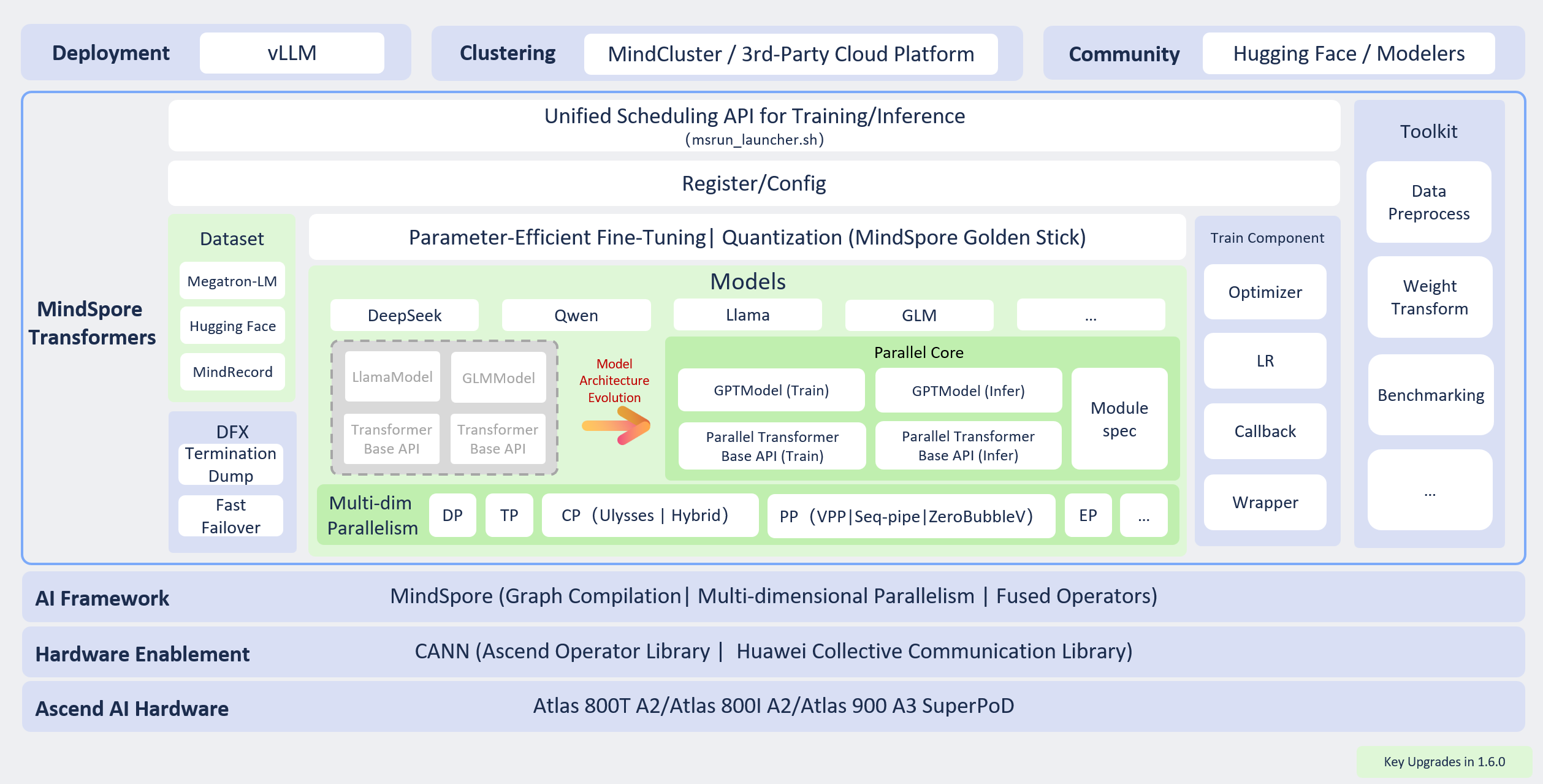
Preparing for the task: Determine the configurations of the model to be trained and prepare the training dataset. These two points are critical.
Modifying training configurations: Set configuration items based on the existing hardware resources, models, and data. The configuration items include basic, advanced, and high-level configurations. Different levels of configuration items allow training tasks to achieve different objectives.
Starting a training task: Start a training task across different cluster scales based on the existing hardware resources and training configurations.
Monitoring training status: After the task is executed, monitor the training status using various methods provided by MindSpore Transformers for subsequent debugging and optimization.
The following describes the key processes of MindSpore Transformers in LLM pretraining tasks.
Dynamic graph (PyNative) implementation as the mainline
Since r2.0.0, MindSpore Transformers has focused on dynamic graph (PyNative) implementation as the mainline of evolution. This document is oriented to dynamic graphs by default. Dynamic graphs focus on pretraining scenarios. For capabilities that are not covered by dynamic graphs, such as inference, service-oriented deployment, and quantization, see Static Graph Features.
Training Process
1. Preparing for the Task
Specifying the Model Specifications
MindSpore Transformers supports different series of pretraining models, such as some typical specifications of DeepSeek and Qwen3 series. Currently, dynamic graphs (PyNative) support two types of model structures: DeepSeek-V3 (MoE + MLA + MTP) and Qwen3 (Dense), with the corresponding implementation located in mindformers/models/*/modeling_*_pynative.py. Other existing models are implemented as static graphs. For details, see Model Support Library.
Dynamic graphs use a layered abstraction + modular design. GPTModel (general pretrained model) serves as the unified model interface, which combines modular interfaces such as TransformerBlock, MoELayer, Attention, Linear, Embedding, and Norm and uses the ModuleSpec mechanism to flexibly build models. The model structure and hyperparameters are explicitly configured in the model section of the YAML configuration file. (model_type and architectures are fixed fields, and other structure hyperparameters are transparently passed to the model class.) Currently, dynamic graphs do not support automatic combination of Hugging Face config.json through pretrained_model_dir. Structure parameters must be explicitly specified in the YAML file. For details about the overall structure of dynamic graphs, see Overall Structure
Preprocessing the Dataset
In natural language processing (NLP) tasks, data preprocessing is a key prerequisite for model training. It not only solves problems like noises and inconsistent formats (which contain special characters and garbled characters) in the raw data, but also converts the original text into a numerical form that can be understood by the model through structured conversion (such as tokenization and vectorization). Although general data preprocessing may include full-process operations such as collection, cleaning, and tokenization, the input data in this phase is assumed to have basic quality (that is, "clean" data). Therefore, the focus is on the core objective of token conversion.
In dynamic graph mode, the dataset configuration is located in the train_dataset field of the YAML configuration file. Currently, the following two dataset loading modes are supported, covering common open-source and custom scenarios:
Megatron dataset: Datasets in the Megatron-LM format can be loaded, which is applicable to pretraining tasks of large-scale language models.
MindRecord dataset: MindRecord is an efficient data storage and reading module provided by MindSpore. It can convert different public datasets into the MindRecord format for training.
For details about the processing and configuration, see Datasets.
Processing Pretraining Data
For the Megatron dataset, MindSpore Transformers provides the data preprocessing script preprocess_indexed_dataset.py to convert the original text corpus in json format into .bin or .idx files. This solution supports multi-source mixing.
Flexible configuration: Multiple bin data files can be loaded at the same time, and the sampling ratio parameter can be used to control the hybrid weight of different data sources.
Efficient training: The binary storage format greatly improves I/O efficiency, which is especially suitable for large-scale pretraining scenarios.
After the preprocessing is complete, you can configure BlendedMegatronDatasetDataLoader to load the Megatron dataset for pretraining. For details, see Datasets > Megatron Datasets. In addition, MindRecord datasets can be efficiently loaded and sampled from multiple sources using MultiSourceDataLoader. For details, see Datasets > MindRecord Datasets.
2. Preparing Configuration Files
Each pretraining task involves a high number of LLM parameters (usually ranging from billions to trillions). Distributed computing resources are required for efficient training and hyperparameter modification to ensure the normal execution of the task and the final performance metrics of the model. Dynamic graph (PyNative) training uses a YAML file to manage all configurable items in a centralized manner. The dataclass configuration system (TrainConfig and its sub-configuration classes) of mindformers/pynative/config/config.py parses and verifies the YAML file when loading it. A complete configuration consists of the following top-level sections (for details, see Configuration File Description):
Model configuration (
model): Modify the parameters related to the model architecture in the configuration file based on the predefined model specifications, such as the number of layers, number of heads, and hidden layer dimension.Data configuration (
train_dataset): Specify the dataset obtained after preprocessing, and configure the dataset path, data loading mode, and other necessary information.Hyperparameter training (
training,optimizer, andlr_scheduler): Specify the optimizer type, loss function, learning rate, data batch size, and number of training epochs based on the model training strategy.Parallelism strategy (
parallelism): Configure data parallelism (including FSDP/HSDP), tensor parallelism (TP), pipeline parallelism (PP), context parallelism (CP), and expert parallelism (EP) based on the cluster scale and model parameters to support ultra-large model training or performance optimization.Status monitoring (
monitorandprofiler): Set the loss printing interval and configure profiling to collect performance data. In precision debugging tasks, configure the printing/visualization of key values to locate precision problems, such as local norm, local loss, and optimizer status.High availability (
checkpoint): Set the number of steps for saving weights, resumable training weights, balancing loading, and other HA features to ensure stable training.
MindSpore Transformers classifies configurable parameters by configuration type and pre-training scenario, and describes the application scenarios and expected objectives of each layer. The following table describes the details.
| Configuration Type | Description | Configuration Item | Configuration Guide |
|---|---|---|---|
| Basic configurations | You can specify the corresponding configuration items to start a simple training task based on the current model structure. | Dataset | Dataset usage |
| Parallelism configurations |
Parallelism configuration items Distributed parallel training guide |
||
| Hyperparameter training |
Hyperparameters and optimizers for training Other training features (gradient accumulation/gradient clipping/operator fusion/hybrid precision) |
||
| High-level configurations | By configuring this part, you can detect the training status and ensure the continuous execution of multiple training tasks. | Weight saving |
Safetensors weight saving and loading Callbacks configuration > CheckpointMonitor |
| Resumable training | Examples for resumable training after breakpoint | ||
| Online monitoring | Training metrics monitoring and profiling | ||
| Advanced configurations | By specifying these configuration items, you can monitor the status of the training process and optimize performance to ensure stable and high-performance training across different cluster scales. | Performance optimization | Training memory optimization |
| Other training features | Gradient accumulation/gradient clipping/operator fusion/hybrid precision |
Except the preceding configuration items, all configuration items of training tasks are controlled by the configuration file. You can adjust them based on the configuration item description.
Configuration Differences Between Dynamic and Static Graphs
The dynamic graph configuration items are mainly in the preceding 14 top-level sections, which are not completely the same as the YAML fields of the static graph. Do not directly reuse the static graph configuration.
The dynamic graph uses only the Safetensors format to save and load weights. Format conversion between checkpoint and Safetensors is not involved.
Hyperparameters in the
modelsection must be explicitly defined.config.jsonfiles in the Hugging Face community cannot be automatically merged.
3. Starting a Training Task
MindSpore Transformers dynamic graph training supports single-node multi-device and multi-node multi-device distributed training. The cluster scale can be expanded from a single node with eight devices to ultra-large-scale distributed training with tens of thousands of devices. Dynamic graph training is started through run_mindformer.py. You must explicitly specify PYNATIVE_MODE using --mode 1.
Single-device startup: Use
run_mindformer.pyto start a task and select a specific device using the environment variableASCEND_RT_VISIBLE_DEVICES.ASCEND_RT_VISIBLE_DEVICESis used to control the physical NPUs visible to the current process. The value is a device number or a device number list. For example,=0indicates that only physical device 0 is visible to the process. To use device 3, set the value to=3. If there are multiple devices, you can set the value to a list such as=0,1,2,3. If this parameter is not explicitly specified, all devices are used by default.# Specify device 7 for single-device training. export ASCEND_RT_VISIBLE_DEVICES=7 python run_mindformer.py --config /path/to/your.yaml --mode 1
Single-node multi-device/multi-node multi-device startup: Use the
scripts/msrun_launcher.shscript to start distributed tasks based on the msrun tool.# Single-node 8-device bash scripts/msrun_launcher.sh "run_mindformer.py --config /path/to/your.yaml --mode 1" 8
For details about the startup methods (including multi-node multi-device, custom script startup, and troubleshooting during startup), see Starting Tasks. For details about the minimum end-to-end example (DeepSeek-V3 2-device pre-training), see Quick Start.
4. Monitoring Training Status
When the pretraining phase may last for several weeks or months, you need to monitor key metrics in real time and dynamically adjust them to ensure that the trained model can achieve the expected effect. In this case, you need to pay attention to the following status items:
Performance: number of training tokens/samples per second (throughput), NPU usage (computing power usage), and time consumed per step
Precision: loss function value, gradient norm (explosion/collapse prevention), and MaxLogits value health monitoring
Checkpoint: saves the intermediate model status periodically (for example, every N steps) to prevent data loss caused by training interruption.
For different monitoring values, MindSpore Transformers prints detailed logs during dynamic graph training to view the intermediate process status and provides the following monitoring methods:
Training metric monitoring: Configure the grad/param norm, loss monitoring, and MoE monitoring in the
monitorsection. For details, see Configuration File Description > monitor—Training Monitoring.Performance analysis: Enable profiling data collection (such as the operator time consumption, memory, and call stack) in the
profilersection. For details, see Configuration File Description > profiler—Performance Analysis.
After the checkpoint is saved during training or the training is complete, the model weights are saved to the specified path in save_path. Each time the weights are saved, a subdirectory named by step is generated in save_path, containing the Safetensors weight shards, common.json file for resumable training, and metadata.json file for shard layout metadata. You can use the saved weights for resumable training. For details, see Weight Saving and Loading.
Training Practices
MindSpore Transformers provides a more detailed pre-training process and practices.
Quick Start: Take DeepSeek-V3 as an example to describe the end-to-end process of minimum-scale pre-training using two devices. For details, see Quick Start.
Resumable Training Practices: Perform step-level resumable training, including standard resumable training, weight-only initialization, batch size modification for resumable training, and distributed balanced loading. For details, see Resumable Training.