Overall Structure

Starting with r2.0.0, MindSpore Transformers has adopted a dynamic graph (PyNative) implementation as its primary development path. This chapter introduces the overall architecture, core modules, and training capabilities of the dynamic graph training stack, and provides a minimal starting point for implementation.
The Limits of Dynamic Graph Capabilities
The source code for the dynamic graph is located in
mindformers/pynative/.The current dynamic graph focuses on pre-training and fine-tuning scenarios; capabilities such as inference, service deployment, and quantization are still provided by the static graph. For more details, see Static Graph Implementation.
The following figure shows the overall architecture of the dynamic graph training stack. From top to bottom, the entry layer (run_mindformer.py --mode 1) routes through the control layer (Trainer) to the MindSpore Transformers dynamic graph training stack. Its core capabilities consist of model architecture (GPTModel → transformers → layers), training components (configuration, optimizer, loss, callbacks, and tools), and distributed training (multi-dimensional parallelism and memory optimization), built on MindSpore, CANN, and Ascend AI hardware.
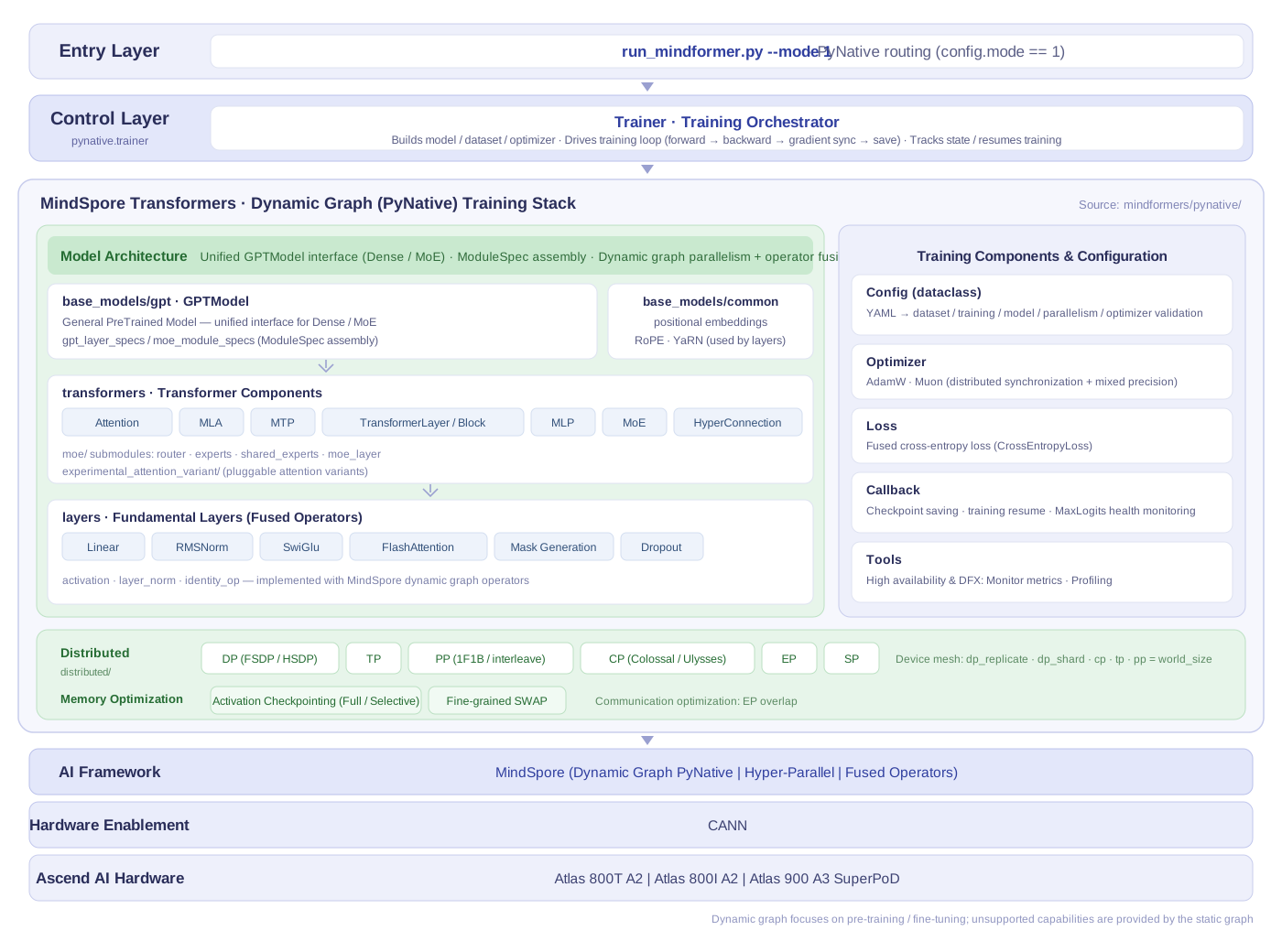
In the figure, Hyper-Parallel refers to the hyper-parallel layer. DP, TP, PP, CP, EP, and SP stand for Data Parallelism, Tensor Parallelism, Pipeline Parallelism, Context Parallelism, Expert Parallelism, and Sequence Parallelism, respectively. FSDP and HSDP stand for Fully Sharded Data Parallelism and Hybrid Sharded Data Parallelism, respectively.
Overview
The dynamic graph implementation adopts a layered, modular design:
Entry Layer: Unified script
run_mindformer.py, routes to dynamic graph trainer via--mode 1(theconfig.mode == 1branch in the source code ofrun_mindformer.py).Control Layer:
mindformers.pynative.trainer.Traineris responsible for building the model/dataset/optimizer, and drives the training loop.Configuration Layer: Centralized management of YAML configurations using dataclasses, with parsing and validation completed during loading.
Capability Layer: Implements multi-dimensional parallelism, fused operators, and memory optimization based on MindSpore's dynamic graph capabilities.
First, look at the "Execution Flowchart", then the "Module Layering Diagram".
Execution Flow
run_mindformer.py --mode 1            # Entry, PYNATIVE_MODE routing
        │
        ▼
mindformers.pynative.trainer.Trainer  # Builds model/dataset/optimizer, drives training loop
        │
        ├── config/        YAML → dataclass configuration system
        ├── base_models/   GPTModel (Unified interface for Dense/MoE)
        ├── distributed/   Multi-dimensional parallelism and memory optimization
        ├── optimizer/     AdamW/Muon
        ├── loss/          Fused cross-entropy
        ├── callback/      Weight saving, Loss/Metric monitoring
        └── tools/         Monitoring & Profiling
Module Layering
The model side is divided into three layers from top to bottom: "Model → Transformer Components → Primitive Layer", corresponding one-to-one with the core module table below:
base_models/gpt/  GPTModel (Unified interface for Dense/MoE, assembled via ModuleSpec)
        │
        ▼
transformers/     Attention · MLA · MTP · TransformerLayer/Block · MLP · MoE
        │                                   (router/experts/shared_experts)
        ▼
layers/           Linear · RMSNorm · SwiGlu · FlashAttention · Mask generation
base_models/common/embeddingsprovides positional encodings such as RoPE, YaRN, etc., for use by the above layers.
Core Modules
The sub-modules of the dynamic graph implementation and their responsibilities are as follows:
Module |
Path |
Responsibility |
|---|---|---|
Trainer |
|
Training controller |
Configuration |
|
Centralized configuration management via dataclasses, supports loading from YAML and validation. |
Distributed |
|
Device mesh construction and sharding for multi-dimensional parallelism, as well as various memory optimizations. |
Optimizer |
|
|
Loss |
|
Dynamic graph fused cross-entropy |
Base Model |
|
General |
Transformer Components |
|
Attention, MLA, MTP, TransformerLayer/Block, MLP, and MoE sub-modules. |
Primitive Layer |
|
Fused operators such as Linear, LayerNorm/RMSNorm, SwiGlu, Flash Attention, mask generation, etc. |
Callback |
|
Checkpoint saving, Loss monitoring, training metric monitoring, MaxLogits health check. |
Tools |
|
Metric monitoring aggregation ( |
The following sections expand on the "Configuration" and "Distributed" modules, which contain more detailed information.
Configuration Module Dataclasses
pynative/config/ maps each section of YAML into independent dataclasses, facilitating validation and default value management. Commonly used configuration classes:
dataclass |
Corresponding Responsibility |
|---|---|
|
Weight saving/loading |
|
Training steps, batch size, gradient accumulation, etc. |
|
Multi-dimensional parallelism dimensions |
|
Optimizer type and hyperparameters |
|
Learning rate strategy |
|
Model structure parameters |
|
Metric monitoring and visualization |
Distributed Module Capabilities
pynative/distributed/ undertakes both "parallelism sharding" and "memory optimization" responsibilities:
Parallelism Dimensions: Data Parallelism (DP, including Fully Sharded Data Parallelism, FSDP, and Hybrid Sharded Data Parallelism, HSDP), Tensor Parallelism (TP), Pipeline Parallelism (PP), Context Parallelism (CP), Expert Parallelism (EP), and Sequence Parallelism (SP). The device mesh is constructed based on the product of each dimension, satisfying
dp_replicate * dp_shard * cp * tp * pp == world_size(parallel_dims.py).Memory Optimization: Activation checkpointing and fine-grained SWAP.
About pet (LoRA) and models subdirectories
The
pynative/pet/andpynative/models/directories currently only contain__init__.pyand have no implementation yet. LoRA fine-tuning is not yet implemented in the dynamic graph: when triggered, it will raiseNotImplementedError("Lora model is not implemented yet.")intrainer/utils.py. For LoRA, please use the static graph implementation.
Model Architecture
The dynamic graph adopts a hierarchical abstraction + modular design: GPTModel (General PreTrained Model) serves as the unified model interface, composing modular interfaces downwards such as TransformerBlock, MoELayer, Attention, Linear, Embedding, Norm, etc., and freely combines them to build models through the ModuleSpec mechanism. All modules have undergone parallel and operator fusion optimizations based on MindSpore's dynamic graph.
The dynamic graph already covers both Dense and MoE (including MLA and MTP) model structures. For the list of implemented models, see Model Support Library.
Training Capabilities
The dynamic graph training stack provides the following capabilities:
Multi-dimensional Hybrid Parallelism: Flexible combination of data parallelism (including FSDP/HSDP parameter sharding), tensor parallelism (TP), pipeline parallelism (PP, supporting 1F1B and interleave), context parallelism (CP, Colossal method), expert parallelism (EP), and sequence parallelism (SP).
Optimizers and Learning Rates: AdamW, Muon; multiple learning rate strategies with warmup.
Dataset: Megatron blended multi-source dataset (
BlendedMegatronDatasetDataLoader, preprocessed.bin/.idxfiles).Memory Optimization: Activation checkpointing (full/selective) and fine-grained SWAP.
Checkpoints: Sharded saving and loading in Safetensors format, supporting asynchronous saving and redundancy elimination.
Stability and Observability: Resuming training from checkpoints, gradient/parameter norm and Loss monitoring, MaxLogits numerical health checks, and Profiling.