
文生视频SOTA模型推理开箱即用!MindSpore支持Step-Video-T2V
文生视频SOTA模型推理开箱即用!MindSpore支持Step-Video-T2V

开发者基于昇思MindSpore AI框架实现了对阶跃星辰 (stepfun-ai ) 开源的 SOTA文生视频模型Step-Video-T2V支持,并将该版本代码开源,同时完成模型推理支持开箱即用。
Step-Video-T2V 具有 30B 参数,能够生成204 帧 544p的高质量视频。为了提高效率,stepfun-ai 提出了一种用于视频的深度压缩 VAE,实现了 16x16 空间和 8 倍时间压缩比,并在最后阶段应用 Direct Preference Optimization (DPO) 进一步提高生成视频的视觉质量。Step-Video-T2V 在文生视频质量评估 benchmark Step-Video-T2V-Eval(https://github.com/stepfun-ai/Step-Video-T2V/blob/main/benchmark/Step-Video-T2V-Eval)上,相比其他开源和或商业模型展示出 SoTA 能力。
本文将介绍基于昇思 MindSpore +单机Atlas 800T A2使用Step-Video-T2V的流程。
开源链接
MindSpore 版 Step-Video-T2V 开源链接:
https://github.com/mindspore-lab/mindone/tree/master/examples/step\_video\_t2v

01 环境准备
- Mindspore 2.5.0 + CANN 8.0.0.beta1(https://www.mindspore.cn/install)
- MindSpore ONE开源仓(支持 diffusers 等SOTA生成式模型https://github.com/mindspore-lab/mindone)
运行以下命令安装依赖:
git clone https://github.com/mindspore-lab/mindone.git

# install mindone
cd mindone
pip install -e .

# install stepvideo
cd examples/step_video_t2v
pip install -e .
02 权重准备
权重可从以下链接获取,按需选择原始模型或蒸馏模型,下载后放到 /path_to/stepfun-ai/stepvideo-t2v/目录。
Models
Huggingface
Modelscope
Step-Video-T2V
https://huggingface.co/stepfun-ai/stepvideo-t2v
https://www.modelscope.cn/models/stepfun-ai/stepvideo-t2v
Step-Video-T2V-Turbo (Inference Step Distillation)
https://huggingface.co/stepfun-ai/stepvideo-t2v-turbo
https://www.modelscope.cn/models/stepfun-ai/stepvideo-t2v-turbo
下载完成后,使用以下命令把 hunyuan-clip 模型权重从 bin 格式转为 safetensors格式。
python convert.py \
    --pt_filename /path_to/stepfun-ai/stepvideo-t2v/hunyuan_clip/clip_text_encoder/pytorch_model.bin \
    --sf_filename /path_to/stepfun-ai/stepvideo-t2v/hunyuan_clip/clip_text_encoder/model.safetensors \
    --config_path /path_to/stepfun-ai/stepvideo-t2v/hunyuan_clip/clip_text_encoder/config.json

我们采用了文本编码器、VAE 解码和 DiT 的解耦策略,以优化 DiT 对 NPU 的资源利用率。因此,除了推理的4卡,我们使用了额外的 NPU 来运行文本编码器嵌入计算、 VAE 解码的 API 服务。
首先分别使用单卡启动 vae / captioner 服务,把返回的 url 地址传给后面推理启动命令,地址一般为 127.0.0.1。
model_dir='/path_to/stepfun-ai/stepvideo-t2v/'

# (1) start vae/captioner server on single-card
# !!! This command will return the URL for both the caption API and the VAE API. Please use the returned URL in the following command.
ASCEND_RT_VISIBLE_DEVICES=0 python api/call_remote_server.py --model_dir $model_dir --enable_vae True &
ASCEND_RT_VISIBLE_DEVICES=1 python api/call_remote_server.py --model_dir $model_dir --enable_llm True &
# !!! wait...a moment, vae/llm is loading…
vae / captioner 服务加载完成后,另起 4卡 启动推理:
# (2) setting and replace the `url` from before command print
parallel=4
sp=2
pp=2
vae_url='127.0.0.1'
caption_url='127.0.0.1'
# (3) run parallel dit model on 4-cards
ASCEND_RT_VISIBLE_DEVICES=2,3,4,5 msrun --bind_core=True --worker_num=$parallel --local_worker_num=$parallel --master_port=9000 --log_dir=outputs/parallel_logs python -u \
run_parallel.py \
    --model_dir $model_dir \
    --vae_url $vae_url \
    --caption_url $caption_url  \
    --ulysses_degree $sp \
    --pp_degree $pp \
    --prompt "一名宇航员在月球上发现一块石碑,上面印有“stepfun”字样,闪闪发光"\
  --infer_steps 50  \
  --cfg_scale 9.0 \
  --time_shift 13.0 \
  --num_frames 204 \
  --height 544 \
  --width 992
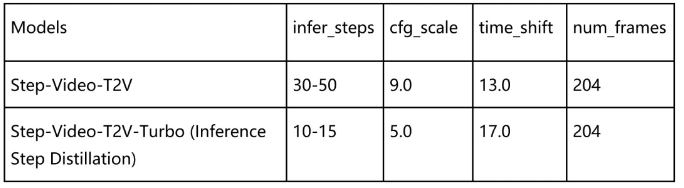
以下是推荐的参数配置,可达到比较好的推理效果:

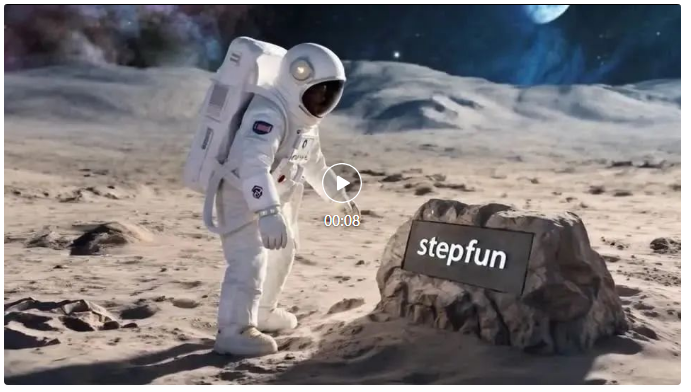
prompt: “一名宇航员在月球上发现一块石碑,上面印有“stepfun”字样,闪闪发光"
height/width/frame: 544px992px204f
 (视频观看链接)