Performing Cloud-side Distributed Inference Using Python Interface

Overview
For scenarios where large-scale neural network models have many parameters and cannot be fully loaded into a single device for inference, distributed inference can be performed using multiple devices. This tutorial describes how to perform MindSpore Lite cloud-side distributed inference using the Python interface. Cloud-side distributed inference is roughly the same process as Cloud-side single-card inference and can be cross-referenced. MindSpore Lite cloud-side distributed inference has more optimization for performance aspects.
MindSpore Lite cloud-side distributed inference is only supported to run in Linux environment deployments with Atlas training series as the supported device types. As shown in the figure below, the distributed inference is currently initiated by a multi-process approach, where each process corresponds to a Rank in the communication set, loading, compiling and executing the respective sliced model, with the same input data for each process.
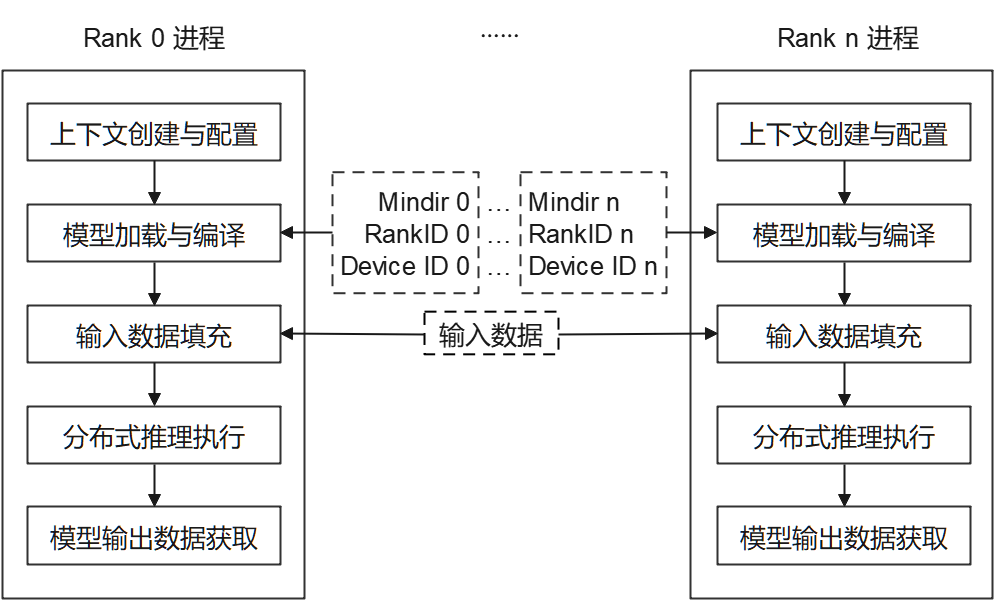
Each process consists of the following main steps:
Model reading: Slice and export the distributed MindIR model via MindSpore. The number of MindIR models is the same as the number of devices for loading to each device for inference.
Context creation and configuration: Create and configure the Context, and hold the distributed inference parameters to guide distributed model compilation and model execution.
Model loading and compilation: Use the Model.build_from_file interface for model loading and model compilation. The model loading phase parses the file cache into a runtime model. The model compilation phase optimizes the front-end computational graph into a high-performance back-end computational graph. The process is time-consuming and it is recommended to compile once and inference multiple times.
Model input data padding.
Distributed inference execution: use the Model.predict interface for model distributed inference.
Model output data obtaining.
Multi-process execution of distributed inference programs.
Preparation
To download the cloud-side distributed inference python sample code, please select the device type: Ascend. The directory will be referred to later as the example code directory.
Slice and export the distributed MindIR model via MindSpore and store it to the sample code directory. For a quick experience, you can download the two sliced Matmul model files Matmul0.mindir, Matmul1.mindir.
For Ascend device type, generate the networking information file through hccl_tools.py as needed, store it in the sample code directory, and fill the path of the file into the configuration file
config_file.iniin the sample code directory.Download the MindSpore Lite cloud-side inference installation package mindspore-lite-{version}-linux-{arch}.whl, store it to the sample code directory, and install it via
pip.
The main steps of MindSpore Lite cloud-side distributed inference will be described in the subsequent sections in conjunction with the code, and please refer to main.py in the sample code directory for the complete code.
Creating Contextual Configuration
The contextual configuration holds the required basic configuration parameters and distributed inference parameters to guide model compilation and model distributed execution. The following sample code demonstrates how to create a context through Context.
# init context
context = mslite.Context()
Ascend is supported in distributed inference scenarios, and can be specified by Context.target to specify the device to run.
Configuring Ascend Device Context
When the device type is Ascend (Atlas training series is currently supported by distributed inference), set Context.target to Ascend and set DeviceID, RankID by the following way. Since Ascend provides multiple inference engine backends, currently only the ge backend supports distributed inference, and the Ascend inference engine backend is specified as ge by ascend.provider. The sample code is as follows.
# set Ascend target and distributed info
context.target = ["Ascend"]
context.ascend.device_id = args.device_id
context.ascend.rank_id = args.rank_id
context.ascend.provider = "ge"
Configuring the Ascend GE Compile Cache
The GE backend compiles operators for the whole graph during the model compilation phase, which may take minutes for large models. MindSpore Lite can cache the compilation result of the whole graph in a specified directory: on subsequent startups, if the compilation conditions are exactly the same, the cached artifact is loaded directly and online compilation is skipped, which shortens the time to load the model and to run the first inference. This capability takes effect only when ascend.provider is ge.
The compile cache is configured through the config_file parameter of Model.build_from_file. It is recommended to set model_cache_dir in the [ascend_context] section:
[ascend_context]
model_cache_dir=/home/xxx/ge_compile_cache
For distributed inference, use a separate directory for each Rank (for example, /home/xxx/ge_compile_cache/rank{r}). See the usage constraints below for details.
Alternatively, set the native GE option ge.graph_compiler_cache_dir in the [ge_session_options] section, which has the same effect:
[ge_session_options]
ge.graph_compiler_cache_dir=/home/xxx/ge_compile_cache
If both are configured, model_cache_dir in the [ascend_context] section takes precedence. model_cache_dir is recommended: the framework verifies that the directory exists and is writable, and if the directory is unavailable it only disables the cache and prints a WARNING without affecting inference; whereas if ge.graph_compiler_cache_dir is configured directly and the directory does not exist, GE reports an error (E13026) because it cannot find the cache directory.
Usage constraints:
The cache directory must be created in advance and be writable. It is recommended to use a dedicated empty directory and not to mix it with directories used for other purposes.
For distributed inference, each
Rankmust use its own cache directory. The cache key does not containRankinformation, so if multipleRanks share the same directory, their cached artifacts overwrite each other; no error is reported, but the inference result may be wrong. It is recommended to append theRankID to the directory path, for examplemodel_cache_dir=/home/xxx/ge_compile_cache/rank{r}. Alternatively, configure a separatege.graph_keyfor eachRank(it must be set in the[ge_graph_options]section; if set in[ge_session_options], it is overwritten by the cache key generated by the framework and has no effect). If the graphs of multipleRanks are confirmed to be identical (for example, they share the same prefix graph), they can share a directory; otherwise, separate the directories byRankby default.The cache is reused only when the compilation conditions are the same: the MindIR graph structure and operator attributes, the compilation-related options in the configuration file, and the SoC model must be the same. If any condition changes, the cache is automatically invalidated and online compilation is used again; artifacts compiled under other conditions are never reused. A cache miss therefore means "the model is fully recompiled once", which is expected. Note that the CANN version is not part of the cache key, so after upgrading or changing CANN, verify whether the cache takes effect and whether the inference accuracy meets expectations; it is also recommended to use a different cache path for different models.
The cache directory path itself does not affect cache hits, so you can warm up the cache in the build environment and then copy the whole cache directory to the deployment environment (provided that the SoC and the configuration are the same). Copy the cache directory in full: a missing cache file may cause a cache miss; in distributed scenarios, warm up and distribute the directory for each
Rankseparately.After reinstalling or updating a custom operator (operator vendor package), clear the cache directory manually. The operator implementation is not part of the cache key; if the cache is not cleared, artifacts compiled from the old operator may be reused.
The cache key does not contain the MindSpore Lite version: after upgrading MindSpore Lite, the old cache may still be hit. If the cache needs to be rebuilt for the new version (for example, if the compilation behavior is confirmed to have changed), clear the cache directory manually after the upgrade and warm up again.
Memory optimization mode (model_cache_mode=mem_opt): in addition to specifying the cache directory, you can enable the memory optimization mode in the [ascend_context] section:
[ascend_context]
model_cache_mode=mem_opt
model_cache_dir=/home/xxx/ge_compile_cache/rank{r}
Configuring
model_cache_modeenables the graph-level compile cache; ifmodel_cache_diris not configured,./model_build_cache_<rank>is created in the current working directory by default (already separated byRank). If the current working directory is not writable, the cache is automatically disabled and loading continues (a WARNING is printed), so loading does not fail; however, GE compilation may still need to generate temporary files in the current directory, so it is still recommended to explicitly specify a writablemodel_cache_dir.mem_optmeans that at load time a minimal placeholder graph with the same name as the graph is added to the GE session instead of the full graph, and the artifact already compiled in the cache directory is reused during execution, which reduces the memory usage of the session. Therefore it depends on a complete existing cache: the first run, with no cache yet, still performs a full compilation in the regular way, and the mode takes effect only on subsequent loads after the cache is ready.If the index for the graph is missing from the cache directory (for example, the cache has been cleared), the framework automatically skips this mode and loads in the regular way. Functionality is not affected; only the memory optimization is lost.
As with the regular cache, multiple
Ranks must use separate directories (see usage constraint 2); the default directory ofmem_optis also separated byRank.
After a cache hit, the GE INFO log prints Cache is enable, cache_dir=..., graph_key=..., and .om, .rdcpkt, .idx and other artifacts appear in the cache directory; comparing the model compilation time of the next startup makes the hit easy to confirm. The first deployment (empty cache) still requires a full compilation; in a production environment, it is recommended to warm up with the same version and configuration in the build phase and then distribute the cache directory with the deployment artifacts, so that the first startup in production hits the cache.
In addition, during the first compilation, TE_PARALLEL_COMPILER in the [ascend_context] section can be used to enable TBE operator parallel compilation (number of parallel compilation processes, value range 1 to 32, default 8), which further shortens the deployment wait together with the compile cache.
Model Creation, Loading and Compilation
Consistent with MindSpore Lite Cloud-side Single Card Inference, the main entry point for distributed inference is the Model interface for model loading, compilation and execution. Create Model and call the Model.build_from_file interface to implement the model loading and model compilation, the sample code is as follows.
# create Model and build Model
model = mslite.Model()
model.build_from_file(model_path, mslite.ModelType.MINDIR, context, config_file)
Model Input Data Padding
First, use the Model.get_inputs method to get all the input Tensor, and fill in the Host data through the related interface. The sample code is as follows.
# set model input as ones
inputs = model.get_inputs()
for input_i in inputs:
    input_i.set_data_from_numpy(np.ones(input_i.shape, dtype=np.float32))
MindSpore Lite input can also be constructed in the following way.
# np_inputs is a list or tuple of numpy array
inputs = [mslite.Tensor(np_input) for np_input in np_inputs]
Distributed Inference Execution
Call the Model.predict interface to perform distributed inference, with the following sample code.
# execute inference
outputs = model.predict(inputs)
Model Output Data Obtaining
The model output data is stored in the output Tensor defined in the previous step, and the output data can be accessed through the relevant interface. The following example code shows how to access the output data and print it.
# get output and print
for output in outputs:
    name = output.name.rstrip()
    data_size = output.data_size
    element_num = output.element_num
    print("tensor's name is:%s data size is:%s tensor elements num is:%s" %
          (name, data_size, element_num))
    data = output.get_data_to_numpy()
    data = data.flatten()
    print("output data is:", end=" ")
    for i in range(10):
        print(data[i], end=" ")
    print("")
Performing Distributed Inference Example
Start the distributed inference in the following multi-process manner. Please refer to run.sh in the sample code directory for the complete run command. When run successfully, the name, data size, number of elements and the first 10 elements of each output Tensor will be printed.
# for Ascend, run the executable file for each rank using shell commands
python3 ./ascend_ge_distributed.py --model_path=/your/path/to/Matmul0.mindir --device_id=0 --rank_id=0 --config_file=./config_file.ini &
python3 ./ascend_ge_distributed.py --model_path=/your/path/to/Matmul1.mindir --device_id=1 --rank_id=1 --config_file=./config_file.ini
Multiple Models Sharing Weights
In the Ascend device and graph compilation grade O2 scenario, a single card can deploy multiple models, and models deployed to the same card can share weights. For details, please refer to Advanced Usage - Multiple Model Sharing Weights.