
MindSpore Made Easy | Compiling the GPU Version of MindSpore in Windows
MindSpore Made Easy | Compiling the GPU Version of MindSpore in Windows
MindSpore has not offered a GPU version for Windows for quite some time, despite high demand from user surveys and customer feedback. This is due to the fact that the CUDA compilation tool relies on the Microsoft MSVC compiler, cl.exe, in Windows, preventing the use of the MinGw GCC toolchain for compilation. However, after overcoming numerous engineering challenges, a MSVC-based MindSpore GPU version is now available and can be used to compile the code in the current master branch. To try out the new MindSpore GPU version on Windows, follow the following steps.
1. Compilation Preparations
Prepare the following tools and libraries for compiling the MindSpore GPU version on Windows.
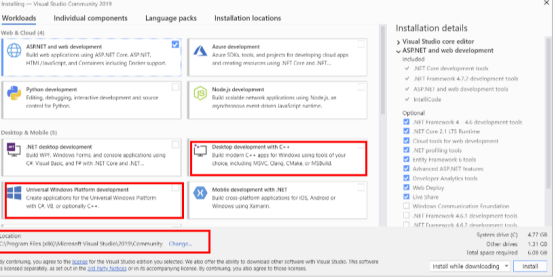
(1) Install Microsoft Visual Studio Community 2019[1].
Download the community edition, and install the components shown in the figure. You can also switch to a non-C drive for installation.
(2) Install Git for Windows[2].
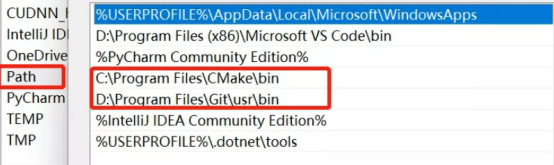
Add the Git directory to the Path environment variable. If Git is installed in D:\Program Files\Git, add D:\Git\usr\bin to the Path environment variable.
(3) Install CMake 3.18.3[3].
The installation path cannot contain Chinese or Japanese characters. After the installation is complete, add the CMake path to the Path environment variable.
(4) Install Python[4].
The Python version must be 3.7.5 or higher. You can select a proper version from Huawei Cloud and install it.
(5) Install CUDA and cuDNN.
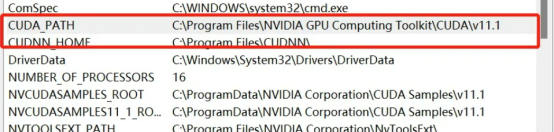
Download CUDA[5] and cuDNN[6] from the NVIDIA official website. Select CUDA 11.1 or 11.6. CUDA is an executable installation package, so simply click Install to begin the installation process. Select cuDNN 11.1 or 11.6. After downloading and decompressing the package, add the cuDNN installation directory to the CUDNN_HOME environment variable. In addition, to use cuDNN, you need to download an additional zlib dynamic link library zlibwapi.dll and add the path to the Path environment variable.
2. MindSpore GPU Compilation
Open the CLI, run git clone git@gitee.com:mindspore/mindspore.git to download the MindSpore master code repository, go to the MindSpore code directory from the CLI, and run the following compilation commands:
set FROM_GITEE=1
call build.bat ms_vs_gpu
Wait for about two hours (depending on the computer performance) to complete the version compilation. The compiled GPU version is stored in build/package in the code repository. You can run pip install mindspore_gpu-2.0.0-cp39-cp39-win_amd64.whl to install the GPU version.
Mode                 LastWriteTime         Length Name
----                 -------------         ------ ----
d-----         2022/8/31     11:09                build
d-----         2022/8/31     20:06                dist
d-----         2022/8/31     20:06                mindspore
d-----         2022/8/31     20:06                mindspore_gpu.egg-info
-a----         2022/8/31     20:06       93617923 mindspore_gpu-2.0.0-cp39-cp39-win_amd64.whl
3. Running the MindSpore GPU Version
Download the MindSpore handwritten digit tutorial code[7], install pip install mindvision (MindSpore Vision suit), and run python mindspore_quick_start.py --device_target=GPU. We can see training jobs are executed successfully, indicating that the compiled version functions properly.
(py39) PS C:\Users\iambowen\Downloads> python .\mindspore_quick_start.py --device_target=GPU
...
epoch: 1 step: 125, loss is 2.284395456314087
epoch: 1 step: 250, loss is 2.2882909774780273
epoch: 1 step: 375, loss is 2.294778823852539
epoch: 1 step: 500, loss is 2.3158369064331055
epoch: 1 step: 625, loss is 2.3036279678344727
epoch: 1 step: 750, loss is 1.9158216714859009
epoch: 1 step: 875, loss is 0.3985179364681244
epoch: 1 step: 1000, loss is 0.14882513880729675
epoch: 1 step: 1125, loss is 0.21342350542545319
epoch: 1 step: 1250, loss is 0.07935728877782822
epoch: 1 step: 1375, loss is 0.14339512586593628
epoch: 1 step: 1500, loss is 0.08406876772642136
epoch: 1 step: 1625, loss is 0.013466060161590576
epoch: 1 step: 1750, loss is 0.07948829233646393
...
Download Links
[1]https://learn.microsoft.com/zh-cn/visualstudio/releases/2019/release-notes
[3]https://github.com/Kitware/Cmake/releases/tag/v3.18.3
[4]https://repo.huaweicloud.com/python/
[5]https://developer.nvidia.com/cuda-11.1.1-download-archive