
AI Design Pattern | How to Practice the Pipeline Mode on MindSpore
AI Design Pattern | How to Practice the Pipeline Mode on MindSpore
Developers process data based on the data processing operators (such as shuffle, map, and batch) and data processing engine provided by the framework for subsequent training. The training is always performed with a scale of data. Datasets COCO and ImageNet exceed 10 GB and 100 GB, respectively. As a result, it is challenging to process data efficiently. In a CPU, instruction fetching, decoding, execution, memory access, and write-back of different instructions are completed in parallel in each clock cycle with the instruction pipeline technology, accelerating data processing.
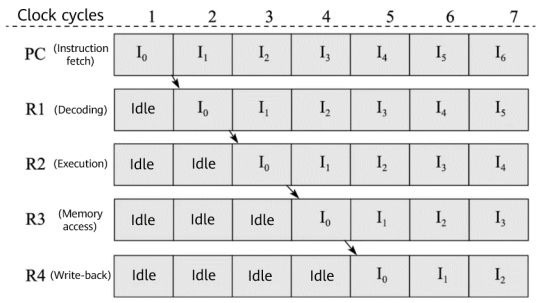
From chapter 9 of Introduction to Computer Architecture (third edition)
Similar to the CPU instruction pipeline, we introduce a parallel processing mechanism to accelerate massive data processing. That is, the pipeline mode.
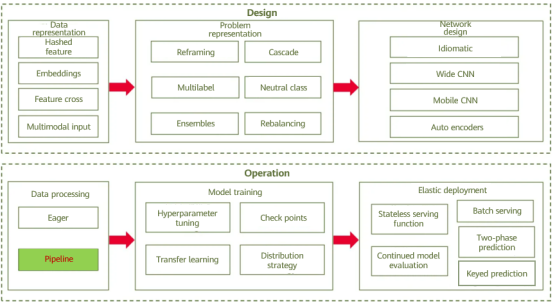
Overview of AI design patterns
01
Pattern Definition
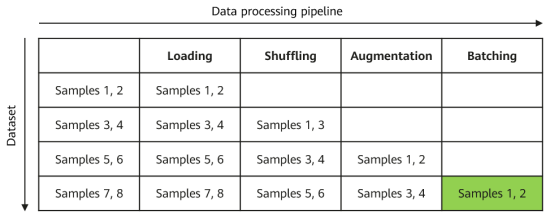
The pipeline mode for data processing divides the entire process into multiple phases and performs parallel processing in each phase to achieve efficiency. As shown in the following figure, the data processing operations are divided into loading, shuffling, augmentation, and batch processing to form a pipeline. Each pipeline processes sample data in parallel.
02
Solution
Generally, the pipeline mode is supported by the data processing module of the AI frameworks. For example, the data processing engine of MindSpore implements the following pipeline:

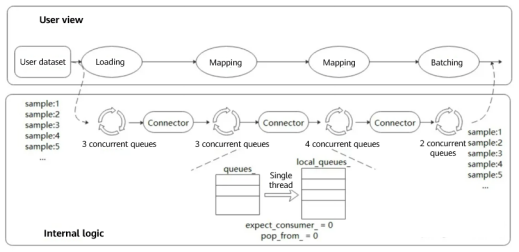
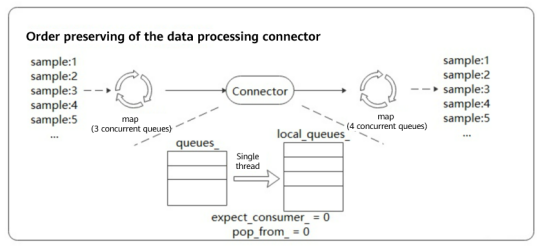
Different from TensorFlow and PyTorch, MindSpore adopts multi-stage parallel pipelines for data processing, which can plan computing resources in finer granularity. As shown in the following figure, each dataset operator contains an output connector, that is, an order preserving buffer queue consisting of a group of blocking queues and counters. Each dataset operator obtains buffered data from the connector of the upstream operator for processing, and then pushes the buffered data to its own output connector.
The advantages are:
Operations such as dataset loading, mapping, and batch processing are driven by a task scheduling mechanism. Tasks of each operation are independent of each other, and contexts are linked by connectors.
Each operation can implement fine-grained multi-thread or multi-process parallel acceleration. Data frameworks provide users with APIs for adjusting the number of operator threads and controlling multi-processing. In this way, the processing speed of each node can be flexibly controlled to achieve optimal performance of the entire data processing pipeline.
Users can set the connector size and effectively control the memory usage to adapt to different networks.
For this mechanism, preserving the order of output data (during pipeline operation, the order of output data is the same as that before data processing) is the key to ensuring training precision. MindSpore uses the polling algorithm to ensure the order during multi-thread processing. The following figure shows a data processing pipeline. Order preserving is performed during fetching of the downstream map operator (four concurrent queues). Data in the upstream queue is fetched in single-thread polling mode.
There are two counters in the connector. expect_consumer_ records the number of consumers that have obtained data from queues_, and pop_from_ records which internal blocking queue will fetch data next time. expect_consumer_ is the remainder of consumers, and pop_from_ is the remainder of producers.
When expect_consumer_ is 0 again, all local_queues_ have finished the previous batch of tasks and can continue to allocate and process the next batch. In this way, multi-concurrency order preserving is implemented for upstream to downstream mapping.
03
Cases
A distinctive feature of pipeline-based execution is that the map operator needs to be defined. For example, in the following pipeline, the map operator schedules the startup and execution of Resize, Crop, and HWC2CHW, and maps and transforms pipeline data.
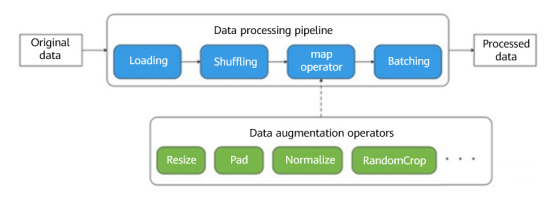
Image Data Processing
In the reference document, we adopted the MindSpore framework for recognizing handwritten digits based on the MNIST dataset, and used data pipelines during image data processing. In the following data processing code, we defined five operations: TypeCast (data type conversion), Resize (image size adjustment), Rescale (data standardization), Rescale (normal distribution), and HWC2CHW (transposition). Then, the map operator starts scheduling. After the processing is complete, data is sent for shuffling and batching, and the pipeline operations are completed.
def create_dataset(data_path, batch_size=32, repeat_size=1):    # The file path and batch size of the dataset
    # 1. Define the dataset.
     mnist_ds = ds.MnistDataset(data_path)
     # 2. Define the mapping to be operated.
     type_cast_op = C.TypeCast(mstype.int32)
    resize_op = CV.Resize((32, 32), interpolation=Inter.LINEAR)     # The image size is adjusted to 32 x 32, which ensures the feature map to be 28 x 28, the same as the original image.
     rescale_nml_op = CV.Rescale(1 / 0.3081 , -1 * 0.1307 / 0.3081)  # Standardization coefficient of the dataset
     rescale_op = CV.Rescale(1.0 / 255.0, 0.0)                       # After standardization, the obtained values are normally distributed.
     hwc2chw_op = CV.HWC2CHW()                                       # Transposition
     # 3. Use the map function to apply data operations to the dataset.
     mnist_ds = mnist_ds.map(operations=type_cast_op, input_columns="label")
     mnist_ds = mnist_ds.map(operations=[resize_op, rescale_op, rescale_nml_op, hwc2chw_op], input_columns="image")
     # 4. Perform shuffling and batching operations.
     buffer_size = 10000
     mnist_ds = mnist_ds.shuffle(buffer_size=buffer_size)
     mnist_ds = mnist_ds.batch(batch_size)
     return mnist_ds
Text Data Processing
Now, let's use the data pipeline to implement word segmentation on sentences through Jieba. Download the Jieba dictionary and place the dictionary files hmm_model.utf8 and jieba.dict.utf8 in the dictionary directory.
from mindvision.dataset import DownLoad

#Path for storing dictionary files
dl_path = "./dictionary"

# Obtain the dictionary source file.
dl_url_hmm = "https://obs.dualstack.cn-north-4.myhuaweicloud.com/mindspore-website/notebook/datasets/hmm_model.utf8"
dl_url_jieba = "https://obs.dualstack.cn-north-4.myhuaweicloud.com/mindspore-website/notebook/datasets/jieba.dict.utf8"

# Download dictionary files.
dl = DownLoad()
dl.download_url(url=dl_url_hmm, path=dl_path)
dl.download_url(url=dl_url_jieba, path=dl_path)
The following example constructs a Chinese text dataset "明天天气太好了我们一起去外面玩吧" (It means "The weather is great tomorrow so let's go outside.") Then we use the HMM and MP dictionary files to create the JiebaTokenizer object, perform word segmentation on the dataset, and display the text results before and after word segmentation.
import mindspore.dataset as ds
import mindspore.dataset.text as text

# Construct data to be segmented.
input_list = ["明天天气太好了我们一起去外面玩吧"]
HMM_FILE = "./dictionary/hmm_model.utf8"
MP_FILE = "./dictionary/jieba.dict.utf8"

# Load the data set.
dataset = ds.NumpySlicesDataset(input_list, column_names=["text"], shuffle=False)

print("------------------Before segmentation------------------")
for data in dataset.create_dict_iterator(output_numpy=True):
    print(text.to_str(data['text']))


# Use JiebaTokenizer to perform word segmentation on the dataset and use the map operator for scheduling.
jieba_op = text.JiebaTokenizer(HMM_FILE, MP_FILE)
dataset = dataset.map(operations=jieba_op, input_columns=["text"])

print("-------------------After segmentation-------------------")
for data in dataset.create_dict_iterator(num_epochs=1, output_numpy=True):
    print(text.to_str(data['text']))
The output is as follows:
------------------Before segmentation------------------
明天天气太好了我们一起去外面玩吧
-------------------After segmentation-------------------
['明天' '天气' '太好了' '我们' '一起' '去' '外面' '玩吧']
The output shows that words are properly segmented.
According to the code implementation of the preceding two cases, despite its better performance, the data pipeline is slightly complex in coding and data reading (iteration).
04
Summary
The pipeline mode can efficiently process massive data. However, it consumes a relatively large quantity of system resources, including CPU and memory resources. Taking ImageNet training as an example, the memory usage may reach 30 to 50 GB. Therefore, the pipeline mode is not suitable for training scenarios with a small volume of training data and insufficient training resources, or inference scenarios (scattered samples). In this case, users can adopt the Eager mode to directly invoke data processing operators in serial mode. Moreover, during development and debugging, the multi-thread parallel mode poses more challenges than the single-thread Eager mode. You can select the data processing mode as required.
References