
[AI Design Patterns] 04-Data Processing in Eager Mode
AI Design Patterns 04-Data Processing in Eager Mode
[AI Design Patterns] 04-Data Processing in Eager Mode
June 1, 2022
As mentioned in our previous blog, if resources permit, we can use the Pipeline mode to accelerate processing and achieve higher performance. However, with small volume of training data, insufficient training resources, or scattered inference samples, we may fail to apply the Pipeline mode or the code implementation will be complex. In this case, operators for data processing can be directly called to complete data processing in serial mode, which is also known as the Eager mode.
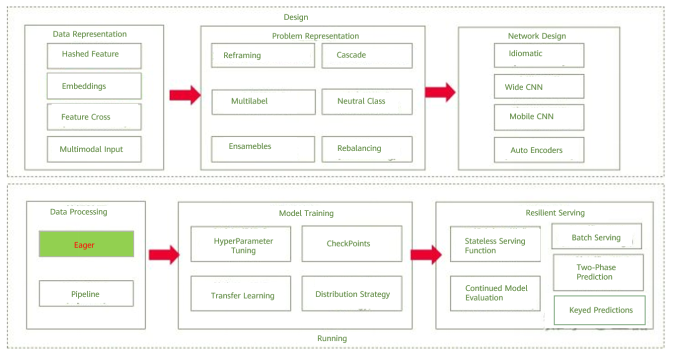
Overview of AI design patterns
Pattern Definition
In Pipeline mode, the map operator needs to be defined. It starts and executes the specified data augmentation operator (which can be executed in parallel) to map and change pipeline data. In code implementation, developers need to gradually define operators in each phase of the data pipeline starting from building the input source. The data augmentation operator is involved only when the map operation is performed. For simpler scenarios, the Pipeline mode will increase development burden.
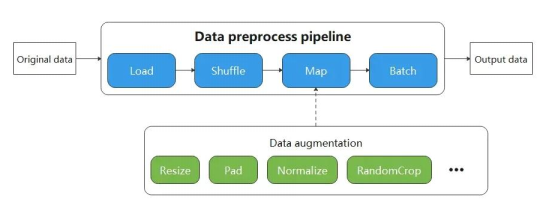
The Eager mode is a lightweight mode for data processing. Developers execute data processing operators by calling functions without building pipelines. Code compilation is simpler and can be executed immediately to obtain running results. It is applicable to lightweight scenarios such as small-scale data augmentation experiments and model inference. As shown in the following figure, compared with the Pipeline mode, the Eager mode needs no pipeline for data processing, making it easier for developers.

Currently, common operators and operators for image/text processing can be executed on MindSpore in Eager mode, which is supported in the vision module (mindspore.dataset.vision), text module (mindspore.dataset.text) and transform module (mindspore.dataset.transforms) on MindSpore.
Cases
The following describes how to process image and text data in Eager mode using the MindSpore dataset interface.
Image Data Processing
The banana image is used as an example for image conversion in Eager mode of MindSpore. First, download the image from OBS.
import wget


wget.download("https://obs.dualstack.cn-north-4.myhuaweicloud.com/mindspore-website/notebook/datasets/banana.jpg", ".")
Then, the c_transforms and py_transforms operators in the vision module are mixed to transform the given image. The Eager mode of the vision operator supports the numpy.array or PIL.Image types of data as the input parameter, and pipelines are not required during the process.
import numpy as np

from PIL import Image

import matplotlib.pyplot as plt

import mindspore.dataset.vision.c_transforms as C

import mindspore.dataset.vision.py_transforms as P


banana = Image.open("banana.jpg").convert("RGB")

print("Image.type: {}, Image.shape: {}".format(type(banana), banana.size))


# Defines the resize operation and executes it immediately.

squared_banana = C.Resize(size=(320))(banana)

print("Image.type: {}, Image.shape: {}".format(type(squared_banana), squared_banana.shape))


# Defines the CenterCrop operation and understands the execution (the size of the middle part of the image is 280 x 280).

squared_banana = C.CenterCrop((280, 280))(squared_banana)

print("Image.type: {}, Image.shape: {}".format(type(squared_banana), squared_banana.shape))


# The ToPIL() interface converts the NumPy image into a Pillow image to facilitate subsequent padding.

to_pil = P.ToPIL()

padding = P.Pad(40)

squared_banana = padding(to_pil(squared_banana))

print("Image.type: {}, Image.shape: {}".format(type(squared_banana), squared_banana.size))


# Comparison of image processing with and without matplotlib to draw images.

plt.rcParams['font.sans-serif']=['KaiTi']

plt.subplot(1, 2, 1)

plt.imshow(banana)

plt.title("original image")

plt.subplot(1, 2, 2)

plt.imshow(squared_banana)

plt.title("processed image")

plt.show()
Text Data Processing
The following example shows how the Eager mode is applied in text processing for word segmentation and type conversion.
import mindspore.dataset.text.transforms as text

from mindspore import dtype as mstype


# Defines the word segmentation operation of WhitespaceTokenizer and executes it immediately.

txt = "Welcome to Beijing !"

txt = text.WhitespaceTokenizer()(txt)

print("Tokenize result: {}".format(txt))


# Defines the ToNumber operation and executes it immediately.

txt = ["123456"]

to_number = text.ToNumber(mstype.int32)

txt = to_number(txt)

print("ToNumber result: {}, type: {}".format(txt, type(txt[0])))

Output:

Tokenize result: ['Welcome' 'to' 'Beijing' '!'] # Word segmentation result

ToNumber result: [123456], type:  # Result of converting a character string to an integer
Summary
The code implementation in Eager mode is simpler than that in Pipeline mode. Therefore, the Eager mode can be used to quickly implement functions when high performance is not required or the data volume is small.
References