
[MindSpore Made Easy] Model Training - Resumable Training at a Checkpoint (1)
MindSpore Made Easy Model Training - Resumable Training at a Checkpoint (1)
June 13, 2022
Author: kaierlong
Source: https://bbs.huaweicloud.com/forum/forum.php?mod=viewthread&tid=187445
Development environment
MindSpore 1.7.0
Contents
· Examples in Documents
· Guess and Verification
· Source Code Exploration
· Cases
· Summary
· Reference
1. Examples in Documents
1.1 Official Document
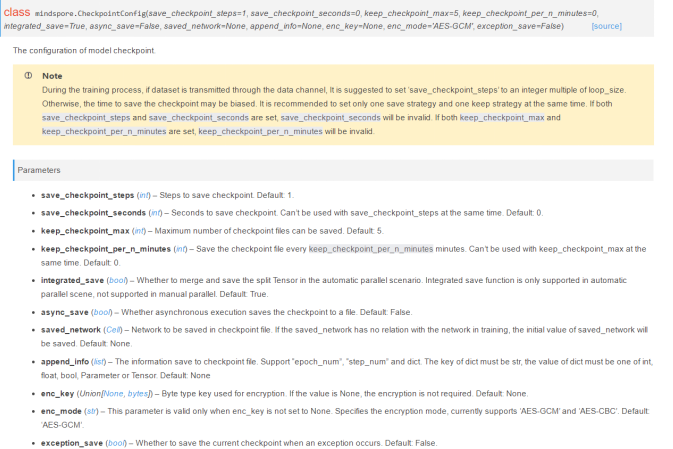
The exception_save parameter (bool type) controls the new resumable training function added in MindSpore 1.7.0, but the official document does not specify its application scenarios. See the following figure.
1.2 Official Example
For details about the official example, see Saving and Exporting Models.
MindSpore provides the resumable training function. As it is enabled, if an exception occurs during training, MindSpore automatically saves the checkpoint file (last checkpoint) generated when the exception occurs.
Resumable training is controlled by the exception_save parameter (bool type) in CheckpointConfig. If this parameter is set to True, resumable training is enabled. If it is set to False, resumable training is disabled. The default value is False. The last checkpoint file saved in resumable training and the checkpoint files saved in the normal process do not affect each other. Their naming mechanism and save path are the same. The only difference is that _breakpoint will be added to the end of the last checkpoint file name. The parameter usage is as follows:
from mindspore.train.callback import ModelCheckpoint, CheckpointConfig

# Enable resumable training.

config_ck = CheckpointConfig(save_checkpoint_steps=32, keep_checkpoint_max=10, exception_save=True)
If an exception occurs during training, the last checkpoint is automatically saved. If the exception occurs in the tenth step of the tenth epoch during training, the saved last checkpoint file is as follows:
# The name of the last checkpoint file is suffixed with _breakpoint to distinguish it from the checkpoint files in the normal process.
resnet50-10_10_breakpoint.ckpt
2. Guess and Verification
In section 1.1, I mentioned that the official website does not provide the application scenarios of this parameter, so I'll make a guess and verify it.
Guess: The parameter takes effect when the training is manually terminated.
Next, I'll verify it using code.
I selected the source code of my own open source case fashion_mnist_classification_with_cnn_by_mindspore and made some modifications.
For details about the data processing and execution of this case, see its README.md.
2.1 Setting exception_save to False
The test code is as follows:
#!/usr/bin/env python3

# -*- coding: utf-8 -*-

# -------------------

# @Version : 1.0

# @Author : xingchaolong

# @For : MindSpore FashionMnist LeNet Example.

# -------------------

from __future__ import absolute_import

from __future__ import division

from __future__ import print_function


import argparse


import mindspore.dataset as ds

import mindspore.nn as nn

import mindspore.dataset.transforms.c_transforms as C

import mindspore.dataset.vision.c_transforms as CV


from mindspore import context

from mindspore import dtype as mstype

from mindspore import Model

from mindspore.common.initializer import Normal

from mindspore.dataset.vision import Inter

from mindspore.nn import Accuracy

from mindspore.train.callback import CheckpointConfig, LossMonitor, ModelCheckpoint


def create_dataset(data_path, usage="train", batch_size=32, repeat_size=1, num_parallel_workers=1):

    # Define the dataset.

    fashion_mnist_ds = ds.FashionMnistDataset(data_path, usage=usage)

    resize_height, resize_width = 28, 28

    rescale = 1.0 / 255.0

    shift = 0.0

    rescale_nml = 1 / 0.3081

    shift_nml = -1 * 0.1307 / 0.3081

    # Define the mapping to be operated.

    resize_op = CV.Resize((resize_height, resize_width), interpolation=Inter.LINEAR)

    rescale_nml_op = CV.Rescale(rescale_nml, shift_nml)

    rescale_op = CV.Rescale(rescale, shift)

    hwc2chw_op = CV.HWC2CHW()

    type_cast_op = C.TypeCast(mstype.int32)


    # Use the map function to apply data operations to the dataset.

    fashion_mnist_ds = fashion_mnist_ds.map(

        operations=type_cast_op, input_columns="label", num_parallel_workers=num_parallel_workers)

    fashion_mnist_ds = fashion_mnist_ds.map(

        operations=[resize_op, rescale_op, rescale_nml_op, hwc2chw_op],

        input_columns="image", num_parallel_workers=num_parallel_workers)


    # Perform shuffle, batch, and repeat operations.

    buffer_size = 10000

    fashion_mnist_ds = fashion_mnist_ds.shuffle(buffer_size=buffer_size)

    fashion_mnist_ds = fashion_mnist_ds.batch(batch_size, drop_remainder=True)

    fashion_mnist_ds = fashion_mnist_ds.repeat(count=repeat_size)


    return fashion_mnist_ds
class LeNet5(nn.Cell):

    """

    LeNet network structure

    """

    def __init__(self, num_class=10, num_channel=1):

        super(LeNet5, self).__init__()

        # Define the required operations.

        self.conv1 = nn.Conv2d(num_channel, 6, 5, pad_mode='valid')

        self.conv2 = nn.Conv2d(6, 16, 5, pad_mode='valid')

        self.fc1 = nn.Dense(16 * 4 * 4, 256, weight_init=Normal(0.02))

        self.fc2 = nn.Dense(256, 128, weight_init=Normal(0.02))

        self.fc3 = nn.Dense(128, num_class, weight_init=Normal(0.02))

        self.relu = nn.ReLU()

        self.max_pool2d = nn.MaxPool2d(kernel_size=2, stride=2)

        self.flatten = nn.Flatten()


    def construct(self, x):

        # Use the defined operations to build a feedfoward network.

        x = self.conv1(x)

        x = self.relu(x)

        x = self.max_pool2d(x)

        x = self.conv2(x)

        x = self.relu(x)

        x = self.max_pool2d(x)

        x = self.flatten(x)

        x = self.fc1(x)

        x = self.relu(x)

        x = self.fc2(x)

        x = self.relu(x)

        x = self.fc3(x)

        return x


def train_net(model, epoch_size, data_path, batch_size, repeat_size, ckpt_cb, sink_mode):

    """Define the training method."""

    # Load the training dataset.

    ds_train = create_dataset(data_path, usage="train", batch_size=batch_size, repeat_size=repeat_size)

    model.train(epoch_size, ds_train, callbacks=[ckpt_cb, LossMonitor(125)], dataset_sink_mode=sink_mode)


def test_net(model, data_path):

    """Define the verification method."""

    ds_eval = create_dataset(data_path, usage="test")

    acc = model.eval(ds_eval, dataset_sink_mode=False)

    print("acc: {}".format(acc), flush=True)


def run(data_path, model_dir, device_target="CPU", batch_size=32, train_epoch=5, dataset_size=1):

    context.set_context(mode=context.GRAPH_MODE, device_target=device_target)


    net = LeNet5()

    net_loss = nn.SoftmaxCrossEntropyWithLogits(sparse=True, reduction='mean')

    net_opt = nn.Momentum(net.trainable_params(), learning_rate=0.01, momentum=0.9)


    # Set the model saving parameter.

    config_ck = CheckpointConfig(save_checkpoint_steps=100, keep_checkpoint_max=10, exception_save=False)

    # Apply the model saving parameter.

    ckpt_cb = ModelCheckpoint(prefix="lenet_ckpt", directory=model_dir, config=config_ck)


    model = Model(net, net_loss, net_opt, metrics={"Accuracy": Accuracy()})

    train_net(model, train_epoch, data_path, batch_size, dataset_size, ckpt_cb, False)

    test_net(model, data_path)


def main():

    parser = argparse.ArgumentParser(description='MindSpore FashionMnist LeNet Example.')

    parser.add_argument("--data_path", type=str, required=True, help="fashion mnist data path.")

    parser.add_argument("--device_target", type=str, default="CPU", choices=['Ascend', 'GPU', 'CPU'],

                        help="target device")

    parser.add_argument("--model_dir", type=str, required=True, help="directory to save model ckpt.")

    parser.add_argument("--batch_size", type=int, default=32, help="batch size.")

    parser.add_argument("--train_epoch", type=int, default=5, help="train epoch.")

    parser.add_argument("--dataset_size", type=int, default=1, help="dataset size.")


    args = parser.parse_args()


    run(

        data_path=args.data_path,

        model_dir=args.model_dir,

        device_target=args.device_target,

        batch_size=args.batch_size,

        train_epoch=args.train_epoch,

        dataset_size=args.dataset_size

    )


if __name__ == "__main__":

    main()
Run the following command to execute the code on the foreground:
./data is the data directory. Replace it as required.
./ckpt is the model saving directory. Replace it as required.
python3 main.py --data_path=./data --model_dir=./ckpt
Press Ctrl+C to manually stop the command execution. The output is as follows:
epoch: 1 step: 125, loss is 2.2966978549957275
epoch: 1 step: 250, loss is 2.2930874824523926
epoch: 1 step: 375, loss is 2.257183074951172
epoch: 1 step: 500, loss is 1.0803303718566895
^CWARNING: Logging before InitGoogleLogging() is written to STDERR
[WARNING] RUNTIME_FRAMEWORK(18086,0x10f6e9dc0,Python):2022-05-11-10:56:54.267.943 [mindspore/ccsrc/runtime/graph_scheduler/graph_scheduler.cc:203] IntHandler] Process 18086 receive KeyboardInterrupt signal.
Terminated: 15
Run the tree ckpt command to check the model saving directory. The output is as follows:
ckpt/

├── lenet_ckpt-1_100.ckpt

├── lenet_ckpt-1_200.ckpt

├── lenet_ckpt-1_300.ckpt

├── lenet_ckpt-1_400.ckpt

├── lenet_ckpt-1_500.ckpt

└── lenet_ckpt-graph.meta


0 directories, 6 files
Interpretation: The content of the model saving directory is normal, and no .ckpt file related to _breakpoint is displayed.
2.2 Setting exception_save to True
Change the following test code used in section 2.1
config_ck = CheckpointConfig(save_checkpoint_steps=100, keep_checkpoint_max=10, exception_save=False)
to
config_ck = CheckpointConfig(save_checkpoint_steps=100, keep_checkpoint_max=10, exception_save=True)
2.2.1 Executing Code on the Foreground and Manually Terminating the Execution
Run the following command to execute the test code:
python3 main.py --data_path=./data --model_dir=./ckpt
Press Ctrl+C to manually stop the command execution. The output is as follows:
epoch: 1 step: 125, loss is 2.2990877628326416
epoch: 1 step: 250, loss is 2.3014278411865234
epoch: 1 step: 375, loss is 2.300143003463745
epoch: 1 step: 500, loss is 2.2685062885284424
epoch: 1 step: 625, loss is 1.2246686220169067
^CWARNING: Logging before InitGoogleLogging() is written to STDERR
[WARNING] RUNTIME_FRAMEWORK(22670,0x10c621dc0,Python):2022-05-11-10:59:14.927.645 [mindspore/ccsrc/runtime/graph_scheduler/graph_scheduler.cc:203] IntHandler] Process 22670 receive KeyboardInterrupt signal.
Terminated: 15
Run the tree ckpt command to check the model saving directory. The output is as follows:
ckpt/

├── lenet_ckpt-1_100.ckpt

├── lenet_ckpt-1_200.ckpt

├── lenet_ckpt-1_300.ckpt

├── lenet_ckpt-1_400.ckpt

├── lenet_ckpt-1_500.ckpt

├── lenet_ckpt-1_600.ckpt

└── lenet_ckpt-graph.meta


0 directories, 7 files
2.2.2 Executing Code on the Background and Manually Terminating the Execution
Run the following command to execute the test code:
nohup python3 main.py --data_path=./data --model_dir=./ckpt &
Run the ps aux|grep main command to view the process ID and run the kill command to manually terminate the process.
Run the cat nohup.out command to check the running status of the process. The output is as follows:
epoch: 1 step: 125, loss is 2.308577537536621
epoch: 1 step: 250, loss is 2.303668737411499
epoch: 1 step: 375, loss is 2.3061931133270264
epoch: 1 step: 500, loss is 1.572475790977478
epoch: 1 step: 625, loss is 1.2929679155349731
epoch: 1 step: 750, loss is 0.8329849243164062
Run the tree ckpt command to check the model saving directory. The output is as follows:
ckpt/

├── lenet_ckpt-1_100.ckpt

├── lenet_ckpt-1_200.ckpt

├── lenet_ckpt-1_300.ckpt

├── lenet_ckpt-1_400.ckpt

├── lenet_ckpt-1_500.ckpt

├── lenet_ckpt-1_600.ckpt

├── lenet_ckpt-1_700.ckpt

├── lenet_ckpt-1_800.ckpt

└── lenet_ckpt-graph.meta


0 directories, 9 files
Interpretation: In the test examples in sections 2.2.1 and 2.2.2, exception_save is set to True. In 2.2.1, I execute the code on the foreground and manually terminate the training. In 2.2.2, I execute the code on the background and kill the training process. However, no .ckpt files of the _breakpoint type are generated in the model saving directory. That is, the parameter usages in the test examples are incorrect.