
[MindSpore Made Easy] A Common Problem in Submitting PR on Gitee — mindspore-clano
MindSpore Made Easy A Common Problem in Submitting PR on Gitee — mindspore-clano
August 9, 2022
Official website: https://www.mindspore.cn/en
Gitee master repository: https://gitee.com/mindspore/mindspore
Hello, everyone. This is the fourth blog in this series. To see the first three ones, visit:
[MindSpore Made Easy] Getting Started with Git + Gitee
[MindSpore Made Easy] PR and Issue Processes on Gitee
[MindSpore Made Easy] Git Conflict Resolution Process
As an open source project, everyone is welcome to contribute on MindSpore. Our projects are mainly open-sourced on Gitee, where many friends have submitted pull requests (PRs) to participate in contributions. However, problems may also emerge during PR submission, including the error mindspore-cla/no.
What should we do if this error is reported?
The error message indicates that the email addresses in the PR fail the CLA check. The bot checks whether the email addresses of all submitters in the PR have been used to sign the CLA. Generally, this problem occurs in the following scenarios:
· The CLA is not signed by all.
· Email addresses entered for signing the CLA are incorrect.
· A new device is used to submit the PR, and the email address is not set.
· Gitee is reinstalled.
· Changes are committed on the web page. (The official email address of Gitee is used for commits by default.)
Don't worry. Follow our steps to solve this problem.
· Visit the following website:
https://gitee.com/api-server/v5/swagger#/getV5ReposOwnerRepoPullsNumberCommits
· Enter related information to view the commit details.
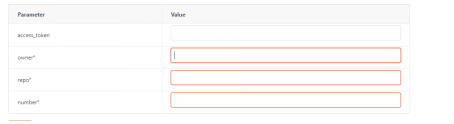
The items marked with asterisks (*) are mandatory. Take a submitted PR as an example:

1. Owner: address of the repository
2. Repo: repository path
3. Number: sequence number of the PR
The following figure shows the query result with the email address marked.
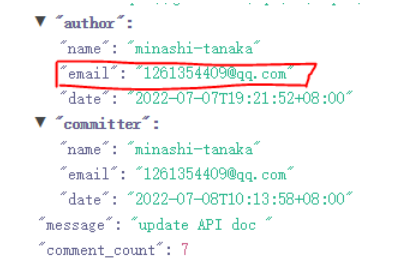
· Check your local email address for commits:
Run the git config user.email command.
· Solution 1
Sign the CLA using all email addresses in the commits. For details, see [MindSpore Made Easy] PR and Issue Processes on Gitee: https://bbs.huaweicloud.com/forum/forum.php?mod=viewthread&tid=111208
· Solution 2:
Run the git config --global user.email "xxxx.com" command to set the email address used for signing the CLA as the local email address.
· Last but not least, comment check-cla below the PR to restart the CLA check after everything is ready.
The problem is solved now. You can have a try and leave your comments below. Any suggestions are welcome!