
Support for macOS Added in MindSpore 1.6
Support for macOS Added in MindSpore 1.6

MindSpore is an open source AI framework that facilitates easy development, efficient execution (training and inference), and device-edge-cloud deployments. As an open framework, it supports popular Linux distributions and Windows since v1.5.0, and macOS on x86 and M1 in v1.6.0. MindSpore equips you with the perfect tools for training and inference of typical networks such as LeNet, ResNet, CRNN, and TinyBERT on macOS.
How Do I Install MindSpore for macOS?
Pre-installation Check and Preparation
The following table lists the software and hardware supported by MindSpore for macOS. Due to Python's limited support for Apple M1, Python 3.9.1 or later is required for macOS running on M1.
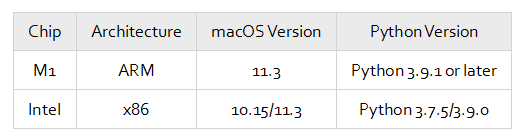
By default, Python is installed on macOS. If you need to install a later version, download the installation package from either of the following links:
Python 3.9.0: https://repo.huaweicloud.com/python/3.9.0/python-3.9.0-macosx10.9.pkg
Python 3.9.1 (for M1): https://www.python.org/ftp/python/3.9.1/python-3.9.1-macos11.0.pkg
You can also use Conda to prepare the Python environment. You are advised to use MiniConda3 and run the following commands to install Python:
conda create -n py39 -c conda-forge python=3.9.0
conda activate py39
Or
conda create -n py391 -c conda-forge python=3.9.1
conda activate py391
Installing MindSpore
Installing MindSpore using pip:
pip install https://ms-release.obs.cn-north-4.myhuaweicloud.com/1.6.1/MindSpore/cpu/x86_64/mindspore-1.6.1-cp39-cp39-macosx_10_15_x86_64.whl --trusted-host ms-release.obs.cn-north-4.myhuaweicloud.com -i https://pypi.tuna.tsinghua.edu.cn/simple   # For x86 CPUs
pip install https://ms-release.obs.cn-north-4.myhuaweicloud.com/1.6.1/MindSpore/cpu/aarch64/mindspore-1.6.1-cp39-cp39-macosx_11_0_arm64.whl --trusted-host ms-release.obs.cn-north-4.myhuaweicloud.com -i https://pypi.tuna.tsinghua.edu.cn/simple   # For M1 CPUs
Installing MindSpore using Conda:
conda install mindspore-cpu=1.6.1 -c mindspore -c conda-forge
After the commands are executed, run the python -c "import mindspore;mindspore.run_check()" command to check whether the installation is successful.
Running MindSpore on macOS
You can further verify the MindSpore installation on macOS by performing a handwritten digit recognition task using a simple LeNet model. For details, see MindSpore Tutorials.
1. Download the MNIST dataset.
Create a data.py file, enter the following content, and run the python data.py command:
import os
import requests

requests.packages.urllib3.disable_warnings()

def download_dataset(dataset_url, path):
    filename = dataset_url.split("/")[-1]
    save_path = os.path.join(path, filename)
    if os.path.exists(save_path):
        return
    if not os.path.exists(path):
        os.makedirs(path)
    res = requests.get(dataset_url, stream=True, verify=False)
    with open(save_path, "wb") as f:
        for chunk in res.iter_content(chunk_size=512):
            if chunk:
                f.write(chunk)
    print("The {} file is downloaded and saved in the path {} after processing".format(os.path.basename(dataset_url), path))

train_path = "datasets/MNIST_Data/train"
test_path = "datasets/MNIST_Data/test"

download_dataset("https://mindspore-website.obs.myhuaweicloud.com/notebook/datasets/mnist/train-labels-idx1-ubyte", train_path)
download_dataset("https://mindspore-website.obs.myhuaweicloud.com/notebook/datasets/mnist/train-images-idx3-ubyte", train_path)
download_dataset("https://mindspore-website.obs.myhuaweicloud.com/notebook/datasets/mnist/t10k-labels-idx1-ubyte", test_path)
download_dataset("https://mindspore-website.obs.myhuaweicloud.com/notebook/datasets/mnist/t10k-images-idx3-ubyte", test_path)
data.py will download the MINIST dataset and organize it into the following directory structure:
./datasets/MNIST_Data
├── test
│   ├── t10k-images-idx3-ubyte
│   └── t10k-labels-idx1-ubyte
└── train
    ├── train-images-idx3-ubyte
    └── train-labels-idx1-ubyte
2. Create train.py to process the data using the dataset module of MindSpore.
import mindspore.dataset as ds
import mindspore.dataset.transforms.c_transforms as C
import mindspore.dataset.vision.c_transforms as CV
from mindspore.dataset.vision import Inter
from mindspore import dtype as mstype

def create_dataset(data_path, batch_size=32, repeat_size=1,
                   num_parallel_workers=1):
    # Define the dataset.
    mnist_ds = ds.MnistDataset(data_path)
    resize_height, resize_width = 32, 32
    rescale = 1.0 / 255.0
    shift = 0.0
    rescale_nml = 1 / 0.3081
    shift_nml = -1 * 0.1307 / 0.3081

    # Define the mapping operations.
    resize_op = CV.Resize((resize_height, resize_width), interpolation=Inter.LINEAR)
    rescale_nml_op = CV.Rescale(rescale_nml, shift_nml)
    rescale_op = CV.Rescale(rescale, shift)
    hwc2chw_op = CV.HWC2CHW()
    type_cast_op = C.TypeCast(mstype.int32)

    # Use the map function to apply data operations to the dataset.
    mnist_ds = mnist_ds.map(operations=type_cast_op, input_columns="label", num_parallel_workers=num_parallel_workers)
    mnist_ds = mnist_ds.map(operations=[resize_op, rescale_op, rescale_nml_op, hwc2chw_op], input_columns="image", num_parallel_workers=num_parallel_workers)

    # Perform shuffle, batch, and repeat operations.
    buffer_size = 10000
    mnist_ds = mnist_ds.shuffle(buffer_size=buffer_size)
    mnist_ds = mnist_ds.batch(batch_size, drop_remainder=True)
    mnist_ds = mnist_ds.repeat(count=repeat_size)

    return mnist_ds
3. Add the following code to lenet.py to define the network using nn.Cell of MindSpore:
import mindspore.nn as nn
from mindspore.common.initializer import Normal

class LeNet5(nn.Cell):
    """
    LeNet network structure
    """
    def __init__(self, num_class=10, num_channel=1):
        super(LeNet5, self).__init__()
        # Define the required operations.
        self.conv1 = nn.Conv2d(num_channel, 6, 5, pad_mode='valid')
        self.conv2 = nn.Conv2d(6, 16, 5, pad_mode='valid')
        self.fc1 = nn.Dense(16 * 5 * 5, 120, weight_init=Normal(0.02))
        self.fc2 = nn.Dense(120, 84, weight_init=Normal(0.02))
        self.fc3 = nn.Dense(84, num_class, weight_init=Normal(0.02))
        self.relu = nn.ReLU()
        self.max_pool2d = nn.MaxPool2d(kernel_size=2, stride=2)
        self.flatten = nn.Flatten()

    def construct(self, x):
        # Use the defined operations to build a forward network.
        x = self.conv1(x)
        x = self.relu(x)
        x = self.max_pool2d(x)
        x = self.conv2(x)
        x = self.relu(x)
        x = self.max_pool2d(x)
        x = self.flatten(x)
        x = self.fc1(x)
        x = self.relu(x)
        x = self.fc2(x)
        x = self.relu(x)
        x = self.fc3(x)
        return x
4. Define and optimize the loss function.
# Define the loss function.
net_loss = nn.SoftmaxCrossEntropyWithLogits(sparse=True, reduction='mean')

# Define the optimizer.
net_opt = nn.Momentum(net.trainable_params(), learning_rate=0.01, momentum=0.9)
5. Add the following training code to train.py:
import os
from mindspore.train.callback import ModelCheckpoint, CheckpointConfig
# Import libraries required for model training.
from mindspore.nn import Accuracy
from mindspore.train.callback import LossMonitor
from mindspore import Model
from lenet import Lenet5

def train_net(model, epoch_size, data_path, repeat_size, ckpoint_cb, sink_mode):
    """ Define the training method."""
    # Load the training dataset.
    ds_train = create_dataset(os.path.join(data_path, "train"), 32, repeat_size)
    model.train(epoch_size, ds_train, callbacks=[ckpoint_cb, LossMonitor(125)], dataset_sink_mode=sink_mode)

# Set the model saving parameters.
config_ck = CheckpointConfig(save_checkpoint_steps=1875, keep_checkpoint_max=10)
# Apply the model saving parameters.
ckpoint = ModelCheckpoint(prefix="checkpoint_lenet", config=config_ck)

# Set the training parameters to run only one epoch.

train_epoch = 1
mnist_path = "./datasets/MNIST_Data"
dataset_size = 1
model = Model(net, net_loss, net_opt, metrics={"Accuracy": Accuracy()})
train_net(model, train_epoch, mnist_path, dataset_size, ckpoint, False)
test_net(model, mnist_path)
6. Run the python train.py command to start training. After 1875 steps are performed according to the model saving parameter, the loss function converges to approximately 0.05.
python train.py
epoch: 1 step: 125, loss is 2.2945752143859863
epoch: 1 step: 250, loss is 2.2834312915802
epoch: 1 step: 375, loss is 2.286731004714966
epoch: 1 step: 500, loss is 2.2865426540374756
epoch: 1 step: 625, loss is 2.1827993392944336
epoch: 1 step: 750, loss is 0.6413211226463318
epoch: 1 step: 875, loss is 0.3101319372653961
epoch: 1 step: 1000, loss is 0.1193467304110527
epoch: 1 step: 1125, loss is 0.09959482401609421
epoch: 1 step: 1250, loss is 0.11662383377552032
epoch: 1 step: 1375, loss is 0.13491152226924896
epoch: 1 step: 1500, loss is 0.11873210221529007
epoch: 1 step: 1625, loss is 0.019252609461545944
epoch: 1 step: 1750, loss is 0.011969765648245811
epoch: 1 step: 1875, loss is 0.0546155609190464
7. Evaluate the model accuracy. Add the following code to train.py:
def test_net(model, data_path):
    """ Define the evaluation method."""
    ds_eval = create_dataset(os.path.join(data_path, "test"))
    acc = model.eval(ds_eval, dataset_sink_mode=False)
    print("{}".format(acc))

test_net(model, mnist_path)
Run the python train.py command to view the model accuracy evaluation result.
{'Accuracy': 0.9663461538461539}
8. Test the model using the test dataset. Create test.py and enter the following content:
import numpy as np
import os
import mindspore.dataset as ds
import mindspore.dataset.transforms.c_transforms as C
import mindspore.dataset.vision.c_transforms as CV
from mindspore.dataset.vision import Inter
from mindspore import dtype as mstype
from mindspore import load_checkpoint, load_param_into_net
from mindspore import Tensor
from mindspore import Model
from lenet import LeNet5


def create_dataset(data_path, batch_size=32, repeat_size=1,
                   num_parallel_workers=1):
    # Define the dataset.
    mnist_ds = ds.MnistDataset(data_path)
    resize_height, resize_width = 32, 32
    rescale = 1.0 / 255.0
    shift = 0.0
    rescale_nml = 1 / 0.3081
    shift_nml = -1 * 0.1307 / 0.3081

    # Define the mapping operations.
    resize_op = CV.Resize((resize_height, resize_width), interpolation=Inter.LINEAR)
    rescale_nml_op = CV.Rescale(rescale_nml, shift_nml)
    rescale_op = CV.Rescale(rescale, shift)
    hwc2chw_op = CV.HWC2CHW()
    type_cast_op = C.TypeCast(mstype.int32)

    # Use the map function to apply data operations to the dataset.
    mnist_ds = mnist_ds.map(operations=type_cast_op, input_columns="label", num_parallel_workers=num_parallel_workers)
    mnist_ds = mnist_ds.map(operations=[resize_op, rescale_op, rescale_nml_op, hwc2chw_op], input_columns="image", num_parallel_workers=num_parallel_workers)

    # Perform shuffle, batch, and repeat operations.
    buffer_size = 10000
    mnist_ds = mnist_ds.shuffle(buffer_size=buffer_size)
    mnist_ds = mnist_ds.batch(batch_size, drop_remainder=True)
    mnist_ds = mnist_ds.repeat(count=repeat_size)

    return mnist_ds

# Initialize the network instance.
net = LeNet5()
# Load the saved model to be tested.
param_dict = load_checkpoint("checkpoint_lenet-1_1875.ckpt")
# Load parameters to the network.
load_param_into_net(net, param_dict)
model = Model(net)

mnist_path = "./datasets/MNIST_Data"

# Define the test data set. Set batch_size to 1 to obtain one image.
ds_test = create_dataset(os.path.join(mnist_path, "test"), batch_size=1).create_dict_iterator()
data = next(ds_test)

# images is the test image, and labels is the actual classification of the test image.
images = data["image"].asnumpy()
labels = data["label"].asnumpy()

# Use the model.predict function to predict the classification of the image.
output = model.predict(Tensor(data['image']))
predicted = np.argmax(output.asnumpy(), axis=1)

# Output the predicted classification and the actual classification.
print(f'Predicted: "{predicted[0]}", Actual: "{labels[0]}"')
Run python test.py. The command output is as follows:
Predicted: "8", Actual: "8"
In the code, we selected an image marked as 8 from the test dataset. The prediction result of the model is also 8, which is the same as the actual label.
Looking forward, more systems and hardware will be supported in future versions of MindSpore to provide better usability for developers. Stay tuned and feel free to give your feedback!

MindSpore website: https://www.mindspore.cn/en
MindSpore Repositories