
DeepSeek-V3 & MindSpore: Training Deployment Made Easy
DeepSeek-V3 & MindSpore: Training Deployment Made Easy
Background
Exciting News for AI Developers: DeepSeek-V3 is Here!
The powerful DeepSeek-V3 model is now integrated with the MindSpore AI framework, running on Ascend AI hardware. This unlocks ready-to-use pre-training and inference, validated by large-scale cluster deployments.
Thanks to MindSpore's foundation model kits and its multi-dimensional hybrid distributed capabilities, automatic parallelism, and dryrun simulation, adapting DeepSeek-V3's advanced architectures was remarkably fast. Furthermore, MindSpore ensures efficient inference deployment, with optimizations for complex structures like MLA and DeepSeekMoE.
Start building with DeepSeek-V3 on MindSpore today! Dive into the open source code and unleash AI potential:
- Pre-training code: https://github.com/mindspore-lab/mindformers/tree/dev/research/deepseek3
- Inference code: https://modelers.cn/models/MindSpore-Lab/DeepSeek-V3
Let's now proceed with the tutorial on DeepSeek-V3 pre-training deployment.
Environment Setup
MindSpore Transformers offers seamless support for DeepSeek-V3 pre-training. We've got a sample configuration file for 128 Atlas 800T A2 (64 G) servers in our repository, with WikiText-2 dataset included. Refer to the README for details.
Want to try it on a single device? We provide a modified configuration that reduces the DeepSeek-V3 model parameter count, allowing you to implement pre-training on a single Atlas 800T A2 (64G) server.
To prepare for training, an Atlas 800T A2 (64 GB) server is required. The environment dependencies for MindSpore Transformers are as follows:
- Python 3.10
- CANN 8.0.RC3.beta1
- Firmware and driver 24.1.RC3
MindSpore offers a dedicated Docker image for DeepSeek-V3 pre-training. Follow these steps for usage.
1. Download the Docker image.
Use the following command to download the Docker image.
docker pull swr.cn-central-221.ovaijisuan.com/mindformers/deepseek_v3_mindspore2.4.10-train:20250209
2. Create a container from the image.
image_name=swr.cn-central-221.ovaijisuan.com/mindformers/deepseek_v3_mindspore2.4.10-train:20250209
docker_name=deepseek_v3
docker run -itd -u root \
--ipc=host --net=host \
--privileged \
--device=/dev/davinci0 \
--device=/dev/davinci1 \
--device=/dev/davinci2 \
--device=/dev/davinci3 \
--device=/dev/davinci4 \
--device=/dev/davinci5 \
--device=/dev/davinci6 \
--device=/dev/davinci7 \
--device=/dev/davinci_manager \
--device=/dev/devmm_svm \
--device=/dev/hisi_hdc \
-v /etc/localtime:/etc/localtime \
-v /usr/local/Ascend/driver:/usr/local/Ascend/driver \
-v /usr/local/Ascend/driver/tools/hccn_tool:/usr/local/bin/hccn_tool \
-v /etc/ascend_install.info:/etc/ascend_install.info \
-v /var/log/npu:/usr/slog \
-v /usr/local/bin/npu-smi:/usr/local/bin/npu-smi \
-v /etc/hccn.conf:/etc/hccn.conf \
--name "$docker_name" \
"$image_name" \
/bin/bash
3. Access the container environment.
Enter the newly created container and navigate to the designated code directory using the command below.
docker exec -ti deepseek_v3 bash
cd /home/work/mindformers
Dataset Preparation
Taking the WikiText-2 dataset as an example, follow the steps below to convert the dataset into a Megatron BIN file.
1. Download the dataset and tokenizer model file.
Dataset: WikiText2 dataset
Tokenizer model: DeepSeek-V3 tokenizer.json
2. Generate a Megatron BIN file.
Place the dataset file wiki.train.tokens and the tokenizer model file tokenizer.json under the /home/work/dataset directory.
Use the following command to convert the dataset file to Megatron BIN format.
cd /home/work/mindformers/research/deepseek3
python wikitext_to_bin.py \
--input /home/work/dataset/wiki.train.tokens \
--output-prefix /home/work/dataset/wiki_4096 \
--vocab-file /home/work/dataset/tokenizer.json \
--seq-length 4096 \
--worker 1
Configuration Example
This procedure outlines the steps to configure a single-node environment for DeepSeek-V3 pre-training. Start with the pretrain_deepseek3_671b.yaml configuration file and save the modified version as pretrain_deepseek3_1b.yaml.
1. Adjust model configuration.
# model config
model:
  model_config:
    type: DeepseekV3Config
    auto_register: deepseek3_config.DeepseekV3Config
    seq_length: 4096
    hidden_size: 2048                                # Set the value to 2048.
    num_layers: &num_layers 3                       # Set the value to 3.
    num_heads: 8                                    # Set the value to 8.
    max_position_embeddings: 4096
    intermediate_size: 6144                          # Set the value to 6144.
    offset: 0                                        # Set the value to 0.
    ……
2. Adjust mixture-of-experts (MoE) configuration.
Follow the instruction below to use the DeepSeek-V3 dedicated Docker image.
#moe
moe_config:
  expert_num: &expert_num 16                      # Set the value to 16.
  first_k_dense_replace: 1                        # Set the value to 1.
  ……
3. Modify parallel configuration.
# parallel config for devices num=8
parallel_config:
  data_parallel: 2                                   # Set the value to 2.
  model_parallel: 2                                  # Set the value to 2.
  pipeline_stage: 2                                  # Set the value to 2.
  expert_parallel: 2                                 # Set the value to 2.
  micro_batch_num: µ_batch_num 4           # Set the value to 4.
      parallel:
        parallel_optimizer_config:
          optimizer_weight_shard_size: 8                  # Set the value to 8.
  ……
4. Adjust learning rate configuration.
# lr schedule
   lr_schedule:
     type: ConstantWarmUpLR
     warmup_steps: 20                                    # Set the value to 20.
5. Modify dataset configuration.
- Configure the dataset path:
# dataset

   train_dataset: &train_dataset

     data_loader:

 type: BlendedMegatronDatasetDataLoader

       config:

         data_path:

           - 1

           - "/home/work/dataset/wiki_4096_text_document"  # Set the dataset path.

    ……
- Configure the dataset parallel communication configuration path:
# mindspore context init config

   context:

     ascend_config:

       parallel_speed_up_json_path: "/home/work/mindformers/research/deepseek3/parallel_speed_up.json"  # Set the dataset parallel communication configuration path.
Training Task Initiation
Navigate to the code root directory and execute the following command to launch a single-node Atlas 800T A2 (64G) pre-training task.
cd /home/work/mindformers
bash scripts/msrun_launcher.sh "run_mindformer.py \
--register_path research/deepseek3 \
--config research/deepseek3/deepseek3_671b/pretrain_deepseek3_1b.yaml"
Once the startup script is executed, the task will be launched in the background. Training logs are saved under /home/work/mindformers/output/msrun_log. Use the following command to view the training logs (Due to pipeline parallelism being enabled with pipeline_stage: 2, loss is only displayed in the log of the last card, worker_7.log. Loss in other logs will show as 0).
tail -f /home/work/mindformers/output/msrun_log/worker_7.log
Training loss chart is shown below:
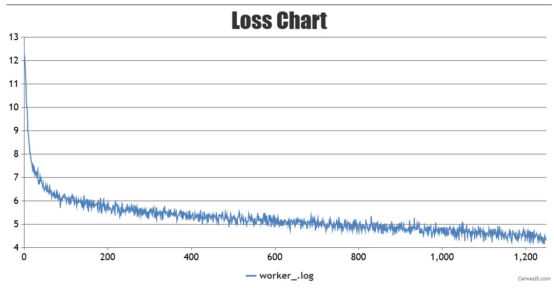
During the training process, weight checkpoints will be saved in the /home/work/mindformers/output/checkpoint directory.
That wraps up our tutorial on DeepSeek-V3 pre-training deployment with MindSpore!
Now it's your turn — get started today by accessing the DeepSeek-V3 image on MindSpore to conduct pre-training deployment and unlock streamlined development workflows.
And a sneak peek —— next week, we will bring you a tutorial on DeepSeek-V3 inference deployment using MindSpore. Stay tuned for that!