
Project Introduction | Experience in Developing MindSpore Insight, an AI-powered Visualization Tool
Project Introduction | Experience in Developing MindSpore Insight, an AI-powered Visualization Tool
Author: Zhang Yutao | School: Zhengzhou University
01 Overview
MindSpore Insight is a visualized debugging and tuning tool. As a developer, I have contributed to the development of certain features of MindSpore Insight. In this blog, I will briefly introduce MindSpore Insight and the reactivity principle of the development framework Vue used in development.
02 Introduction to MindSpore Insight
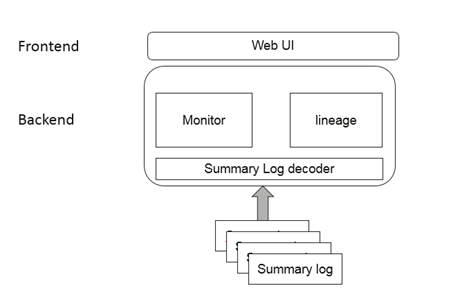
MindSpore Insight provides easy-to-use tuning and debugging capabilities for MindSpore. It records data including scalars, tensors, graphs, computational graphs, model hyperparameters, and training elapsed time in files during training, and analyzes and displays the data on visualized pages. The following figure shows the macro architecture of MindSpore Insight. Summary logs are model logs generated during model training in MindSpore. They are decoded by Python and the corresponding data is processed into APIs in JSON format. In this case, the frontend can request the APIs to display corresponding functions. For details, visit the official website at https://www.mindspore.cn/mindinsight/docs/en/master/index.html.
03 Discussion on the Reactivity Principle of Vue 2
Vue is a JavaScript framework for building user interfaces (UIs) on the web. It is built based on standard HTML, CSS, and JavaScript, and provides a declarative, component-based programming model to help you efficiently develop UIs. Its core features include declarative rendering and reactivity. Vue can automatically track JavaScript state changes and efficiently update the DOM when changes happen. As shown in the figure below, when information in the data property changes, the corresponding view is automatically updated without the need for manually operating the DOM. So how does Vue know the data to be updated? This involves the implementation of reactivity principle of Vue.
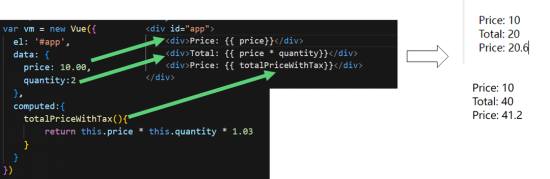
The Vue reactivity refers to that the view is driven by data. That is, when data changes, the view is re-rendered. The following three points need to be considered during the implementation of this process:
● Data hijacking: Track data changes.
● Dependency collection: Collect data on which a view depends.
● Notification view: When data changes, the notification view is partially updated.
3.1 Data Hijacking and Dependency Collection
Data hijacking refers to intercepting the behavior of accessing or modifying a certain property of an object through a piece of code, and performing additional operations or modifying the returned result. The following code explains data hijacking well. Assigning a value to the name property of an object (obj) triggers the set function in the defineProperty method, and accessing the value of the name property of the object triggers the get function. Here, the set and get functions intercept the behavior of accessing and modifying the object property, and additional operations can be written to them. This is called data hijacking.
/*
Object.defineProperty(obj,prop,descriptor)
obj: object whose property is to be defined
prop: name of the property to be defined or modified
descriptor: descriptor of the property to be defined or modified
Output:
Data hijacking set name: Jack
Data hijacking get name: Jack
Jack
*/
const obj={}
Object.defineProperty(obj,"name",{
get(){
console.log("Data hijacking get name :",nameVal);
return nameVal;
},
set(newVal){
console.log("Data hijacking set name :",newVal)
nameVal = newVal
}
});
obj.name="Jack";
console.log(obj.name)
Dependency collection: When a view uses certain data, it depends on that data. Collecting the changing data is the process of dependency collection.
3.2 Implementation Principle
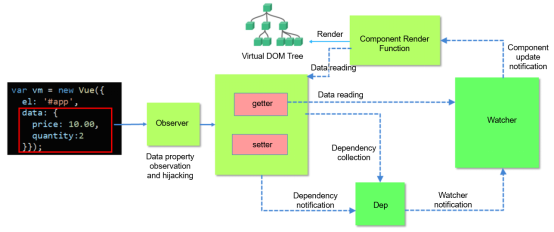 The preceding figure (for details, visit https://blog.csdn.net/Mikon\_0703/article/details/111367773) is a flowchart of implementing the reactivity principle of Vue. It consists of three important parts: Observer: traverses data objects and uses Object.defineProperty() to add setter and getter to properties. In this case, if a value is assigned to an object, the setter is triggered and the data change can be observed. Event center (Dep): collects dependencies and notifies Watchers. If a property changes, the Watchers need to be notified to check whether updates are necessary. Because there are multiple Watchers, a message subscriber (publisher) Dep (management array of Watcher groups) is required to collect these Watchers and manage Observers and Watchers in a unified manner. Each Observer instance has a Dep instance. Watcher: initializes an instruction of the view to a Watcher, and replaces the template data or binds the corresponding function. In this case, when the Watcher receives the change of a property, it executes the corresponding update function to update the view. 3.3 Implementation in Vue Source Code Link to the source code of reactivity implementation of Vue 2: https://github.com/vuejs/vue/blob/v2.6.14/src/core/observer Implementation of the Observer //https://github.com/vuejs/vue/blob/v2.6.14/src/core/observer/index.js walk (obj: Object) { const keys = Object.keys(obj) // Traverse data objects and use Object.defineProperty() to add setter and getter to all properties. for (let i = 0; i < keys.length; i++) { defineReactive(obj, keys[i]) } } export function defineReactive ( obj: Object, key: string, val: any, customSetter?: ?Function, shallow?: boolean ) { const dep = new Dep() const property = Object.getOwnPropertyDescriptor(obj, key) if (property && property.configurable === false) { return } // cater for pre-defined getter/setters const getter = property && property.get const setter = property && property.set if ((!getter || setter) && arguments.length === 2) { val = obj[key] } let childOb = !shallow && observe(val) Object.defineProperty(obj, key, { enumerable: true, configurable: true, get: function reactiveGetter () { const value = getter ? getter.call(obj) : val if (Dep.target) { dep.depend() // Collect dependencies. if (childOb) { childOb.dep.depend() if (Array.isArray(value)) { dependArray(value) } } } return value }, set: function reactiveSetter (newVal) { const value = getter ? getter.call(obj) : val /* eslint-disable no-self-compare */ if (newVal === value || (newVal !== newVal && value !== value){ return } /* eslint-enable no-self-compare */ if (process.env.NODE_ENV !== 'production' && customSetter) { customSetter() } // #7981: for accessor properties without setter if (getter && !setter) return if (setter) { setter.call(obj, newVal) } else { val = newVal } childOb = !shallow && observe(newVal) dep.notify() // When data changes, the event center Dep notifies the Watcher. } }) } Implementation of the Dep //https://github.com/vuejs/vue/blob/v2.6.14/src/core/observer/dep.js export default class Dep { static target: ?Watcher; id: number; subs: Array; constructor () { this.id = uid++ this.subs = [] } addSub (sub: Watcher) { this.subs.push(sub) } removeSub (sub: Watcher) { remove(this.subs, sub) } depend () { if (Dep.target) { Dep.target.addDep(this) } } notify () { // stabilize the subscriber list first const subs = this.subs.slice() if (process.env.NODE_ENV !== 'production' && !config.async) { // subs aren't sorted in scheduler if not running async // we need to sort them now to make sure they fire in correct // order subs.sort((a, b) => a.id - b.id) } for (let i = 0, l = subs.length; i < l; i++) { subs[i].update() // Notify the Watcher to update the view when data changes. } } } Implementation of the Watcher //https://github.com/vuejs/vue/blob/v2.6.14/src/core/observer/watcher.js /** * Subscriber interface. * Will be called when a dependency changes. */ update () { // The Watcher updates the view. /* istanbul ignore else */ if (this.lazy) { this.dirty = true } else if (this.sync) { this.run() } else { queueWatcher(this) } } 04 Summary I would like to thank the MindSpore community for providing this opportunity. This is my first time participating in an open source project, and through this experience, I have learned about the development process of a project and how members in an open source community collaborate to develop and maintain a project. Additionally, this open source experience has taught me how beginners can participate in open source and how to correctly submit pull requests. I will continue to contribute my own strength to open source in the future.