
Implementing Efficient Computation of Matmul for Accelerated MindSpore Network Inference
Implementing Efficient Computation of Matmul for Accelerated MindSpore Network Inference
1 System Environment
Hardware environment: Ascend/GPU/CPU
MindSpore version: any version
Execution mode (PyNative/Graph): any mode
Python version: 3.7/3.8/3.9
OS platform: any OS
2 Error Information
2.1 Error Description
When training a network using MindSpore, it is found that the network inference time is relatively long and requires optimization.
2.2 Error Message
The Profiler analysis shows that most of the time is spent on the Matmul matrix multiplication at the fully-connected layer.
2.3 Script Code
Construct the code based on the description.
3. Root Cause Analysis
According to the error message, the primary cause for slow training is the Matmul matrix multiplication. When dealing with computationally intensive operators, using float32 precision takes longer than using float16 precision. To speed up computations and save time, you can convert the precision type to float16 before performing the computation, and then convert it back to float32 once the computation is complete.
Test the custom code and multiply the values to check the running time difference.
import numpy as np
import mindspore.nn as nn
from mindspore.ops import operations as ops
import mindspore as ms
import time

ms.set_context(mode=ms.GRAPH_MODE, device_target="GPU")

class Net(nn.Cell):
    def __init__(self):
        super(Net, self).__init__()
        self.matmul = ops.MatMul(transpose_b=True)

    def construct(self, x, y):
        return self.matmul(x, y)

x = ms.Tensor(np.arange(10240*10240).reshape(10240, 10240).astype(np.float32))
y = ms.Tensor(np.arange(10240*10240).reshape(10240, 10240).astype(np.float32))

net = Net()
# print(net(x, y))

# Timing
a = time.time()
output = net(x, y)
time32 = time.time() - a
# print(output)
print(output.shape)
print (time32)

net2 = Net()
# Type conversion
x2 = ms.Tensor(x, dtype=ms.float16)
# Timing
b = time.time()
output = net(x, y)
time16 = time.time() - b

# print(output)
print(output.shape)
print (time16)
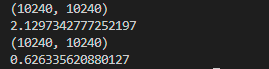
The output shows that using float16 is several times faster than using float32.
4. Solution
Convert the precision type to float16 before performing the computation, and then convert it back to float32 once the computation is complete. This accelerates the computation.
According to the error message, we can locate the error at the fully-connected layer. After conducting computation tests at this layer, we can find that the computation speed is improved by approximately 50 times following the conversion of data types.
import numpy as np
import mindspore.nn as nn
from mindspore.ops import operations as ops
import mindspore as ms
import time

ms.set_context(mode=ms.GRAPH_MODE, device_target="GPU")


x = ms.Tensor(np.arange(10240*10240).reshape(10240, 10240).astype(np.float32))

net = nn.Dense(10240, 60)
# Timing
a = time.time()
output = net(x)
time32 = time.time() - a
# print(output)
print(output.shape)
print (time32)

net2 = nn.Dense(10240, 60)
# Type conversion
x2 = ms.Tensor(x, dtype=ms.float16)
# Timing
b = time.time()
output = net(x)
time16 = time.time() - b

# print(output)
print(output.shape)
print (time16)
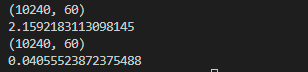
Acceleration: nearly 2.15/0.04 = 50 times
For details, see the official documents.
https://www.mindspore.cn/docs/en/r2.0.0-alpha/api_python/mindspore.html
https://www.mindspore.cn/docs/en/r2.0.0-alpha/api_python/nn/mindspore.nn.Dense.html